
Hardware foundation
Google Pixel
Hardware-backed encryption, key protection, verified boot and limits on password attempts. Titan M2 is available in relevant Pixel generations; we check the exact model before you order.
Google Pixel / GrapheneOS / PmProff
Google Pixel, GrapheneOS and an extended privacy management setup.
Your smartphone. Your data. Your rules.
Explore the features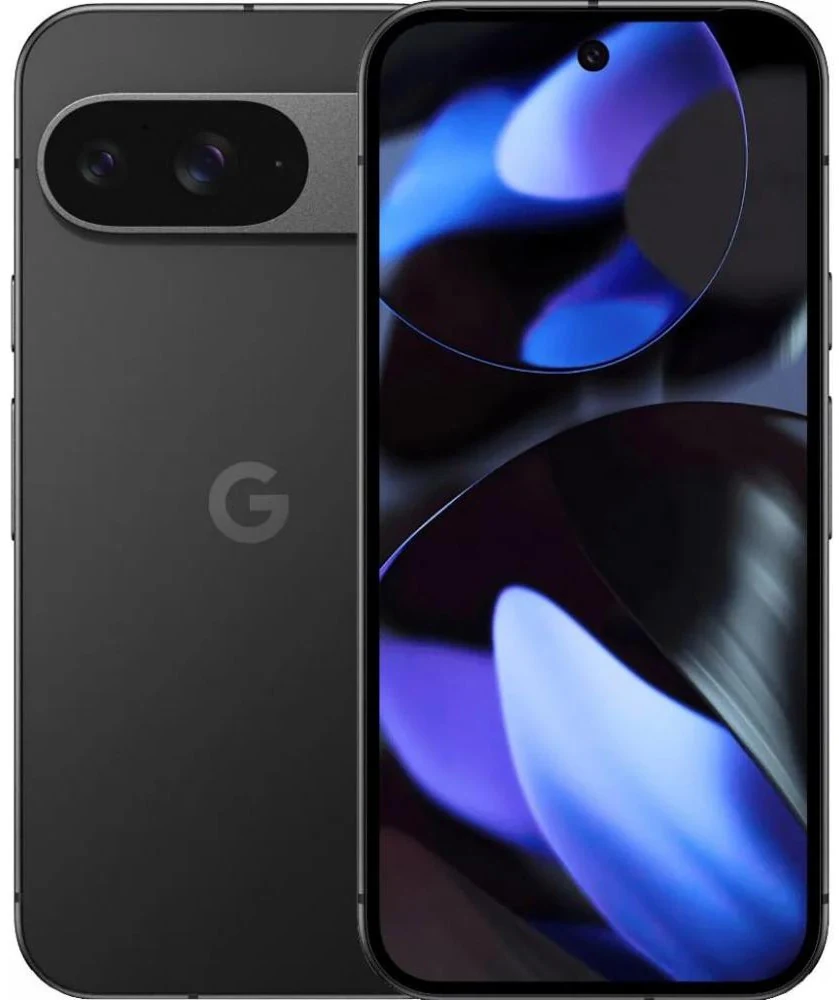
Security architecture
Separate your personal and working life. Decide which apps can access your data. Prepare clear responses if your own phone is lost. We combine Pixel hardware security, GrapheneOS features and a tailored configuration of additional licensed software.
Hardware foundation
Hardware-backed encryption, key protection, verified boot and limits on password attempts. Titan M2 is available in relevant Pixel generations; we check the exact model before you order.
Security-focused operating system
Stronger app isolation, permission and profile controls, data encryption and system updates. The bootloader should remain locked after a correct installation.
Privacy management
Additional licensed software for administrative policies, an alternative interface and automated scenarios. This is a layer on top of GrapheneOS, not a replacement for its security mechanisms.
This is a setup based on GrapheneOS, not a separate operating system. We confirm deployment requirements for the specific additional software version, including operation without root, before you order.
GrapheneOS features
Work conversations do not have to share a space with everyday apps. Profiles help separate accounts, files and connection settings.
Main context
Separate context
Android's primary user manages the device. In a tailored setup it can serve an administrative role; this does not mean that every everyday app must run in it.
A separate user profile for selected apps and data. It is a configured Android profile, not a promise that information is invisible to every form of analysis.
Each user has separate app instances, local data and accounts. Deliberately shared files, cloud services and common external accounts can link these contexts again.
We agree independent unlock methods and VPN settings for the profiles. VPN coverage depends on the profile, app and connection state.
Ending a secondary profile session stops its apps and removes its available working keys from memory. Locking the screen and ending a session are not the same action.
Documentation: GrapheneOS. Features depend on the version and configuration.
GrapheneOS + additional software
The device password, private profile password and administrative PIN serve different purposes. We configure them with a clear distinction between everyday sign-in and irreversible actions.
Protect their respective user profiles. Profile isolation and separate keys are features of Android and GrapheneOS.
A separate access code for the additional software's administrative interface. It does not replace the user profile's encryption password.
GrapheneOS can combine a fingerprint with an additional PIN. This is a built-in OS feature, not an exclusive Graphene Shield feature.
Randomizing the keypad in GrapheneOS reduces the usefulness of observing habitual finger movements when a PIN is entered.
Hardware and system limits slow password guessing. Additional responses to failed attempts are configured separately and may involve data loss.
Documentation: GrapheneOS. Features depend on the version and configuration.
Additional licensed software
Fake Launcher provides a separate everyday appearance for the main profile. We explain which elements are demonstration content and which actually control the device.
Your real apps and everyday tasks.
A separately configured appearance with demonstration content.
Actual screenshots will be added after agreement with the supplier. No invented product interface is shown here.
The alternative home screen's content and icon appearance can be customized within the capabilities of the current software version.
The documentation describes alternative interface apps. Their behavior differs from ordinary system apps and needs to be considered in everyday use.
The additional interface supports its own contacts and SMS content. It does not replace the real accounts or data in every profile.
The software provides lock screen styling and an alternative settings screen. Actual system settings and the demonstration interface must be clearly distinguished.
Features depend on the version and configuration.
Additional licensed software
Profiles, access policies and automated scenarios are managed through a separate interface in the additional software.
The administrative PIN and selected access method are separate from user passwords. Specific activation methods are not published on this marketing page.
The administrator configures the working environment and alternative interface. Profile limits and whether profiles can be changed after installation must be agreed before deployment.
Policies form a clear configuration for your work. After setup, we explain how to use it safely.
The additional software has separate limits for failed administrative attempts. Their consequences may differ from ordinary Android locking.
Features depend on the version and configuration.
GrapheneOS + additional software
Emergency features should be part of your threat model, not a surprise for the owner. We do not enable destructive actions without prior agreement.
A built-in GrapheneOS mechanism for irreversible data deletion. The additional software may offer its own administrative scenarios; these should not be confused with the built-in OS feature.
The additional software's documentation describes multiple emergency codes. Availability and consequences depend on the configuration; specific codes and combinations are not published.
An emergency scenario using a physical button. The risk of accidental activation needs a separate assessment.
A remote command requires the device to receive the relevant message. Connectivity, notification delivery and the active profile affect when it runs; immediate execution without internet access is not guaranteed.
The scope of deletion depends on the mechanism. Before handover, we clarify whether it affects secondary profiles, administrative locking or a full reset.
Data deletion may be irreversible. Important data needs a separate, agreed backup policy.
Documentation: GrapheneOS. Features depend on the version and configuration.
Not every scenario is right for everyone. We select those whose consequences you understand.
Discuss your configurationAdditional licensed software
Agreed rules respond to the device and its environment. Thresholds, dependencies and access recovery are defined before activation.
Responds when the main profile has not been unlocked for an extended period. Unlocking another profile does not necessarily reset this timer.
Responds to an extended loss of connectivity. This is a separate local scenario, not a guarantee that remote commands work offline.
An action after an agreed number of failed entries. The owner must understand which password and profile the rule monitors.
An early session ending or switch as a protection countdown approaches its limit.
A wake-up scheduling mechanism that helps scenarios run while the device sleeps. It still depends on power and system state.
Responds to significant system-time anomalies that affect protection countdowns.
A mechanism related to the time after power loss. We do not describe it as a separate, guaranteed physical battery-removal sensor.
An optional destructive response to a specific USB connection. It is not the same as the safer restriction of USB data transfer.
GrapheneOS's built-in automatic reboot returns data to rest. It is not a factory reset.
The additional restart after Owner profile use has its own logic. It must be coordinated with user habits and other timers.
Timers and automated actions may delete data without another prompt. Travel, unstable connections, repairs and extended power-off periods need to be considered in advance.
Features depend on the version and configuration.
Additional licensed software
Preconfigured modes help change the rules without manually reviewing every setting.
A temporary configuration of stronger restrictions and timers. We account for travel, sleep and periods without connectivity: some timers may expire with data deletion.
Temporarily restricts device availability. According to the documentation, early manual cancellation may not be available and ordinary protection countdowns may continue.
Locks the screen in response to sudden movement detected by sensors. False triggers are possible; it does not recognize every theft or recover a lost phone.
Features depend on the version and configuration.
Additional licensed software
Additional signals for agreed scenarios, not a universal attack detector.
Responds to unusual temperature changes. Heating has many ordinary causes and does not, by itself, prove an attack.
Monitors power readings and events available to the system. Capabilities depend on the model, sensors and software version.
An optional response when a wireless charger is connected. This may be inconvenient for everyday charging.
Monitoring does not guarantee the detection of forensic equipment, malware or vulnerability exploitation.
Features depend on the version and configuration.
GrapheneOS + additional software
GrapheneOS's built-in modes and additional administrative policies operate at different levels. We coordinate them rather than treating them as interchangeable.
GrapheneOS includes USB-C controls, including restrictions while locked and a charging-only mode.
Administrative rules can restrict storage connections and file transfer. We test the accessories you need before handover.
The working configuration should not leave unwanted debugging capabilities open. Installation settings are separated from everyday operation.
Documentation: GrapheneOS. Features depend on the version and configuration.
Additional licensed software
Not every restriction should be enabled at once. We choose them around your needs, app compatibility and backup requirements.
Policies for the camera, microphone, location, Bluetooth, NFC and UWB. The relevant hardware depends on the Pixel model.
Restrictions on 2G, managed Wi-Fi settings and selected wireless features. A policy does not make mobile connectivity anonymous.
Restrictions on app installation, unknown sources, administrative privileges and app management. Changes to profile composition need to be checked for the particular deployment.
Restrictions on Safe Mode and Developer Mode, automatic locking rules and selected system settings.
Restrictions on screenshots, screen recording, printing and crash logs. These do not prevent someone photographing the screen with another device.
An administrative backup ban can conflict with recovery after deletion. The owner chooses the final policy after the risks have been explained.
Features depend on the version and configuration.
Not every scenario is right for everyone. We select those whose consequences you understand.
Discuss your configurationGrapheneOS features
Before and after the first unlock following startup, the system is in different states of key availability. A strong password, encryption and session ending work together.
After a restart, user data has not yet been unlocked with the user's password.
The profile is running. Locking the screen is not the same as returning to BFU.
After a restart, before the first successful unlock, credential-protected files are not yet available for normal user activity.
After sign-in, some data and keys are needed for system operation. Locking the screen again does not return the whole device to its initial state.
A restart returns the device to BFU. End Session returns a particular secondary profile's data to rest, but does not restart the whole phone.
BFU does not mean that every form of access is impossible. The model, updates, password quality and nature of the threat matter.
Documentation: GrapheneOS. Features depend on the version and configuration.
GrapheneOS features
We do not present built-in OS capabilities as our invention. Graphene Shield adds management and configuration on top of the independent GrapheneOS project.
Boot integrity verification and a locked bootloader after installation. These do not replace checking the origin of the installed system.
Memory hardening and stronger app boundaries reduce the attack surface and make certain classes of flaws harder to exploit.
Additional controls over app access to networks and sensors. Rules are chosen for each app.
Restrict file and contact access without unconditionally granting access to all storage or the entire address book.
Google services can be installed as ordinary sandboxed apps. A Google account is not required for GrapheneOS itself.
A hardened browser and system verification tools. An integrity check is not a certificate that every threat is absent.
PIN Scrambling, Two-factor fingerprint unlock and Duress PIN / Password belong to GrapheneOS.
Built-in USB-C control, system support for always-on VPN with connections outside the tunnel blocked, and regular updates. We test the required VPN in the actual configuration.
Documentation: GrapheneOS. Features depend on the version and configuration.
Comparison
GrapheneOS already provides advanced protection. Additional software extends policies and scenarios, but does not make built-in OS features exclusive.
| Feature | Standard GrapheneOS | Graphene Shield |
|---|---|---|
| Hardware-backed encryption | Available on a compatible Pixel | The same hardware foundation |
| Verified Boot / Locked Bootloader | Available | Preserved after correct configuration |
| User profile isolation | Available | Tailored profile configuration |
| End Session | Available | An agreed usage scenario |
| App permission controls | Available | Additional administrative policies |
| USB-C Port Control | Available, including hardware control | Built-in modes plus administrative restrictions |
| Duress PIN / Password | Available | Built-in feature plus separate additional software scenarios |
| Multiple additional emergency codes | Not equivalent to the built-in PIN / password pair | Described for the additional software; configuration-dependent |
| Fingerprint + PIN | Available | Configured as a GrapheneOS feature |
| PIN Scrambling | Available | Configured as a GrapheneOS feature |
| Auto Reboot | Available | Built-in feature coordinated with additional timers |
| Alternative Launcher | Not a built-in GrapheneOS feature | Additional interface |
| Separate administrative panel | Not a built-in GrapheneOS panel | In the additional software |
| Demonstration contacts and messages | Not a built-in GrapheneOS feature | In the additional interface |
| Power Button Wipe | Not a built-in GrapheneOS combination | Additional scenario |
| Remote Wipe | No built-in remote command service | Additional scenario with significant delivery conditions |
| Network Loss Timer | Not a built-in deletion timer | Additional scenario |
| Lock Timer with deletion | Not to be confused with Auto Reboot | Additional scenario |
| Anti-Snatch | Not a built-in GrapheneOS mode | Responds to movement; theft detection is not guaranteed |
| Travel Mode | Not a built-in GrapheneOS mode | Temporary set of additional policies |
| High Risk Mode | Not a built-in GrapheneOS mode | Temporary unavailability subject to software conditions |
| Owner Auto Restart | Not equivalent to built-in Auto Reboot | Additional Owner profile scenario |
| Temperature Monitoring | System thermal protection, not this scenario | Additional heuristic response |
| Voltage Monitoring | System power management | Additional monitoring of available readings |
| Wireless Charger Protection | Ordinary support for compatible charging | Optional additional connection response |
| Extended administrative policies | Built-in Android / GrapheneOS mechanisms | A coordinated set of additional software rules |
| Support and threat model | Self-managed configuration | PmProff service according to the selected package |
How it works
Four short demonstrations will explain everyday use and the consequences of settings. Actual videos are being prepared.
Separate personal matters, business correspondence and access to work documents.
Agreed access rules for company data and a clear response if a device is lost.
A separate environment for documents and client communications, taking backup retention requirements into account.
Separate work accounts, materials and everyday apps according to your own risk model.
Permission and profile controls, configuration checks and clarity about the origin of core features.
Rules agreed in advance for travel, eSIM and periods of unstable connectivity.
More control over apps without a promise of absolute anonymity.
We agree on communication tools, notes, VPN and practical guidance. Subscriptions, additional licenses and servers may be billed separately.
A possible part of private communications. The active profile and notification delivery matter for the additional software's remote scenario.
We agree which messengers you need and test their operation. A separate license may be required depending on the app.
A possible tool for notes. Synchronization and recovery policies need to be chosen separately.
A connection or your own VPN server for the agreed use case. Subscriptions and servers are billed under separate terms.
We check the model, operator and required system components before activation.
Practical guidance on profiles, backups, accounts and protection scenarios.
Packages
First we establish your needs and compatibility. Then we agree the exact scope, licenses and price.
On your Pixel
For owners of a compatible smartphone who want an agreed configuration and clear guidance.
Request pricing
Discuss this packageReady-to-use smartphone
A Google Pixel configured around your everyday needs. The proposal specifies the model, storage and included licenses.
Request pricing
Discuss this packageComprehensive support
For a user or team who need not just devices but rules for handling information.
Request pricing
Discuss this packageGrapheneOS support does not automatically mean compatibility with the full setup. We check the model, storage, system version and availability separately.
The list of confirmed models is being prepared. Tell us your exact Pixel model so we can check setup eligibility. Unverified models are not added to the catalogue.
Questions and answers
No. The underlying operating system is GrapheneOS. PmProff's commercial offering includes additional software, configuration and agreed services.
GrapheneOS does not require root for normal use. Before you order, we check the requirements and deployment method of the specific additional software version; we do not ask users to enable root as an everyday operating requirement.
GrapheneOS is the foundation. Neither the additional software supplier nor PmProff develops this independent project. After installation, we verify the system's origin and bootloader state.
This service is included in Setup. We first check the exact model, GrapheneOS support status, unlock eligibility and the additional software's license terms.
Telegram can be included among the agreed apps. We check notifications and the relevant profile; ordinary Telegram cloud chats should not be treated as end-to-end encrypted.
Compatibility depends on the bank, its checks and Google Play requirements. We test your app list before the switch, without a universal guarantee.
GrapheneOS itself does not require a Google account. Individual apps or services may have their own requirements.
GrapheneOS supports eSIM on compatible devices. Adding and managing profiles may require a separate system component and operator checks.
Yes. The profile, VPN app and policy blocking connections outside the tunnel must be coordinated. Subscription or server costs are determined separately.
The additional software describes a remote scenario. It depends on message delivery, connectivity, the active profile and settings. We do not guarantee immediate execution on a powered-off or offline device.
Removal of the administrative software and redeployment must be agreed with the supplier. Reinstallation or a reset may erase data; we do not promise that simply uninstalling an app is sufficient.
GrapheneOS releases updates for supported models. We confirm compatibility of the specific additional software version with updates and the support terms before handover.
This depends on the administrative configuration. We agree which settings the owner can change and explain the consequences of changing timers and restrictions.
Yes. The additional software has its own license terms. License inclusion, duration, updates and reactivation must be explicitly stated in the proposal.
A reset deletes user data. Redeployment and any requirement for a new license depend on the supplier's terms; automatic free restoration is not promised.
No. Risk depends on the hardware platform, software versions, accounts and user actions. There is no verified universal guarantee against every forensic tool or malware.
Let's start with your needs
Tell us about your device, essential apps and everyday needs. We will suggest a configuration and explain its capabilities and limitations.
Consultation through the PmProff Telegram bot.