
Specifications and technology / Video surveillance
“View on a smartphone” tells you little about the connection path or what must be available for it to work. Consider local recording, remote viewing, device discovery and cloud storage separately. These functions may operate independently.
A P2P connection can still involve a server
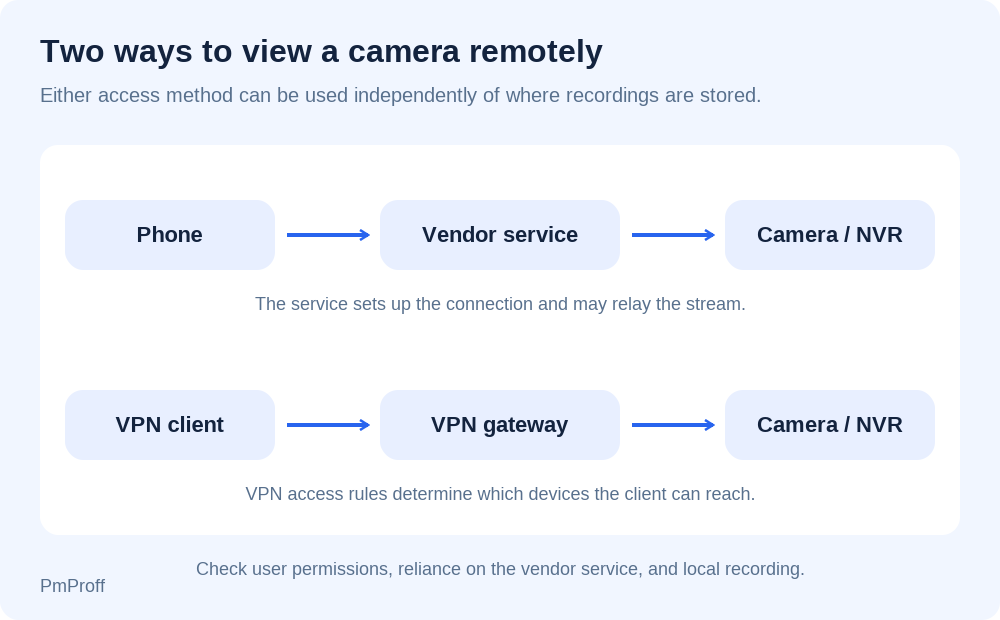
A service may help devices discover each other and establish a connection. Under some conditions it may relay the traffic. Check the architecture for the specific product. Axis describes its Secure Remote Access service as a way to connect a client to cameras on another network. Other manufacturers may implement it differently.
Cloud access and cloud storage
An app may play recordings from a local NVR even though you sign in with a manufacturer account. Find out where footage is stored, which subscription is required and what happens if internet access fails. A “Cloud” label alone does not mean every recording has an off-site backup.
| Option | What to check |
|---|---|
| Manufacturer service / P2P | Account requirements, relaying and support |
| Cloud recording | What is stored and what the plan includes |
| VPN | Gateway, permissions and accessible networks |
| Local NVR | Whether recording continues without an internet connection |
What a VPN changes
A VPN provides a controlled path into the site’s network. The client still needs permission to access the camera or NVR. Axis recommends secure remote access technologies, including VPNs. Keep the VPN software updated and restrict access using rules. Weak device passwords still need attention.
Avoid unnecessary internet exposure
Direct port forwarding makes a service reachable from outside and requires a separate risk assessment. For a home or small office, first consider a supported secure access service or a properly configured VPN. Use individual accounts, grant only the permissions needed and enable an additional sign-in factor where supported.
Testing from a phone
Turn off Wi-Fi on the phone and use the mobile network to check live video, playback and the notifications you need. Then confirm whether local recording continues during an internet outage. Before handing the system over, remove the installer’s temporary access or give the installer a separate, limited account.
Checks before choosing
- Test access from outside your home Wi-Fi.
- Confirm where recordings are stored and which functions depend on a subscription.
- Review the user accounts and their permissions.
Frequently asked questions
Does P2P guarantee that video never passes through a server?
No. Check the documentation for the specific implementation and connection conditions.
Will the camera stop recording if the internet goes down?
Not necessarily. Local recording depends on the configuration and the availability of local storage.
Does a VPN provide access to the whole network?
That depends on the access rules. Permit only the devices and services the user needs.
In brief
Compare the dependencies and permissions of each access method. Test viewing, recording and storage separately.