
Specifications and technology / Video surveillance
Resolution is the number of pixels in a frame. Megapixels help compare formats, but they cannot tell you on their own whether you will see a face at an entrance or useful detail at night.
Start with what you need to see, at what distance, with what field of view and in what light. Then compare 2, 4 and 8 MP options.
What megapixels mean
Multiply the frame width by its height in pixels. For example, 1920 × 1080 = 2,073,600 pixels, or approximately 2.07 MP. Labels such as “4 MP” are rounded, so compare exact frame dimensions.
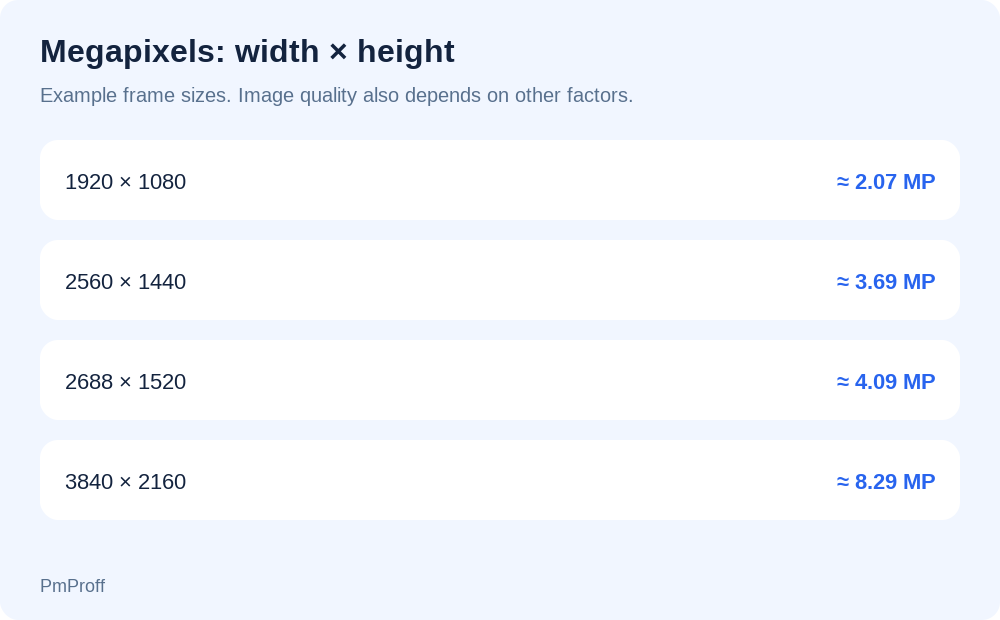
| Frame dimensions | Pixel count | Approximate format |
|---|---|---|
| 1920 × 1080 | 2.07 MP | Full HD / 1080p |
| 2560 × 1440 | 3.69 MP | QHD |
| 2688 × 1520 | 4.09 MP | Example of a roughly 4 MP format |
| 3840 × 2160 | 8.29 MP | 4K UHD |
Two cameras labelled “4 MP” may produce different frame dimensions. Check aspect ratios and available modes. Some models use a different portion of the sensor when you change imaging mode.
How many pixels fall on the subject?
The camera distributes its pixels across the field of view. If the same frame covers a wider area, fewer pixels fall on each metre. At a particular plane in the scene, a useful estimate is horizontal pixel count ÷ scene width in metres.
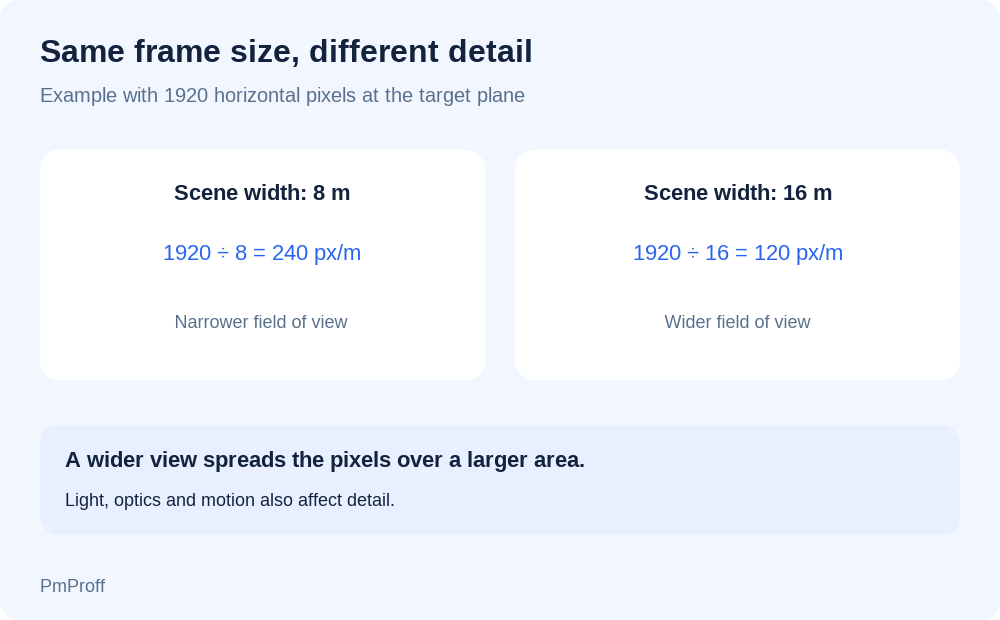
Pixel density cannot guarantee recognition. Lighting, the direction a person is facing, optics and compression affect the result. Density also changes with distance. A value calculated at the entrance may be different at the far edge of a yard.
Define what “seeing the whole yard” means in practice. An overview camera may show events clearly enough overall, while detail at the gate may call for a different field of view or a second angle. Identify the specific area where detail matters.
Field of view and lens
A wide angle covers more ground but can reduce detail on a distant subject. A narrower view may suit a particular passage better. Assess the lens together with the sensor and mounting location. Focal length alone gives an incomplete picture. Axis on surveillance lenses.
Record the mounting height, distance to the target area and its width before buying. For a varifocal model, check that its adjustment range can frame the scene. Digital zoom after recording cannot recover detail absent from the original image.
Why 8 MP does not always give better night images
Sensor size, lens, exposure and processing affect the result. Increasing the pixel count on the same sensor area can make each photosensitive element smaller. Two cameras with the same resolution can therefore behave differently in low light. Axis on sensor size and 4K quality.
Ask for footage in comparable lighting. Check how a person moving through the target area appears, as well as how the stationary building looks.
Licence plate capture requires a suitable angle and imaging settings. A high megapixel count alone cannot turn an overview camera into a dedicated plate-reading system. Axis on licence plate capture.
Check the recording path
Verify that the recorder supports the required high-resolution mode and actually records it. Check the combination of resolution, frame rate, codec and available processing capacity. A mobile substream can have different settings from the camera’s maximum resolution.
Megapixels alone cannot determine storage requirements. You need bitrate, duration and recording mode. A larger frame contains more source information, but compression and the scene also affect the actual bitrate. For these relationships, see Axis on video compression.
Choosing a camera
- Decide whether you need an overview of the event or specific details.
- Measure the distance to the target area and its width.
- Select a field of view and resolution suited to that area.
- Check night footage and moving subjects in the area.
- Match the camera mode to the recorder and storage capacity.
Frequently asked questions
Does 4K always mean exactly 8 million pixels?
The common 4K UHD format, 3840 × 2160, is about 8.29 MP. Check the exact width and height in the product listing.
Can digital zoom make up for missing detail?
Magnification makes existing pixels easier to inspect. It cannot add reliable details that the camera did not record.
Which matters more at an entrance: a wider view or more megapixels?
Choose the combination of field of view and resolution that captures the required detail at the entrance under actual lighting conditions.
Megapixels describe the frame. Its usefulness depends on what you need to see. Start with the target area, distance and light, then choose optics and resolution.