
Specifications and technology / Ethernet
A 100 Mbps port on the path to a computer can limit even a gigabit internet plan. Check Ethernet speed along the full path: ISP equipment, router, switch, cable and client.
A 100 Mbps port can be adequate for a single camera with a low bitrate. Choose the port for the traffic it needs to carry.
What 10/100/1000 means
| Symbol | Nominal link speed | What to look for |
|---|---|---|
| Fast Ethernet / 100BASE-TX | 100 Mbps | May limit a fast internet connection or shared uplink |
| Gigabit / 1000BASE-T | 1000 Mbps | Both ports and the cable must support this mode |
| 2.5GBASE-T | 2500 Mbps | The relevant links along the path must support 2.5G |
10/100/1000 lists the modes of a single port. The two devices normally negotiate one of these rates. Check the actual link speed in the equipment interface or network adapter status.
Finding the bottleneck
Suppose a NAS connects at 2.5 Gbps and the switch connects to a computer over a 100 Mbps link. That link limits file transfer even if the rest of the network is faster. A local transfer to a NAS may never use the internet connection.
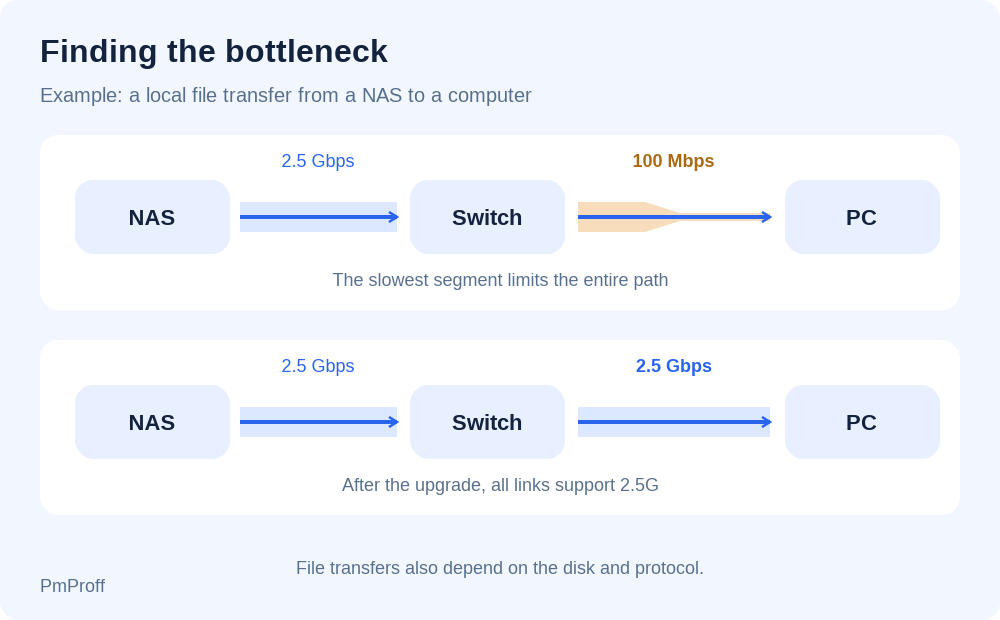
Check WAN and LAN separately. A router with fast Wi-Fi but a 100 Mbps WAN port cannot deliver a gigabit plan over that port. One 2.5G port does not establish that the others also operate at 2.5G.
Megabits and megabytes per second
Divide bits by eight to obtain bytes. 100 Mbps equals 12.5 MB/s, 1000 Mbps equals 125 MB/s and 2500 Mbps equals 312.5 MB/s. These are arithmetic limits before protocol overhead and other losses.
File transfers also depend on the disk, processor, protocol and other traffic. A result below 125 MB/s on a gigabit link does not by itself establish a fault.
Does 2.5G require new cabling?
Not necessarily. 2.5GBASE-T supports a compliant Cat 5e channel up to 100 m. A jacket marking alone cannot confirm the quality of terminations, sockets or a damaged cable. Fluke Networks on testing existing cabling.
Start with a known-good short patch cord between two compatible ports. If it negotiates the expected rate, inspect the permanent run and its connections. One failed test need not mean replacing the entire network.
Camera ports and the shared switch uplink
For a camera streaming at 4 Mbps, a 100 Mbps port has sufficient nominal bandwidth for that stream. The switch uplink, however, carries traffic from multiple devices at once.
For example, 16 streams at 8 Mbps total 128 Mbps before overhead. A single 100 Mbps link cannot carry them all continuously without loss or rate limits. Count actual streams and their directions as well as ports.
Power over Ethernet does not imply a gigabit port. Check port speed, PoE standard and switch power budget separately.
Troubleshooting a slow connection
- Determine whether internet access or local file transfer is slow.
- Check the negotiated speed of each link.
- Try a short known-good cable and another compatible port.
- Check adapter speed and, for a USB adapter, the USB interface.
- Rule out disk, server and concurrent traffic limits.
Port counts, aggregate bandwidth and standards
LAN port count gives the number of local wired connections. A WAN port connects to an external network. Router specifications may also use WAN for a mobile link through a SIM. A configurable WAN/LAN port is one physical connector. When counting free ports, allow for links to switches or routers.
Switching capacity is an aggregate figure. For example, an eight-port full-duplex gigabit switch may be rated at 16 Gbps: eight ports × 1 Gbps × two directions. Each individual port remains gigabit. Cisco lists switching capacity and packet forwarding rate separately.
IEEE 802.3u, 802.3ab and 802.3bz refer to different Ethernet modes. 802.3x covers flow control. 802.1Q covers VLANs, 802.1p priorities, 802.1X access control, 802.1AB LLDP and 802.3az energy efficiency. Check the specific switch for management features as well as the list of standards.
Ports and switching capacity
Read port counts by role: WAN, LAN, uplink, PoE or SFP. Ports on the same device can have different speeds and power capabilities. A link to another switch may occupy one, leaving fewer ports for clients.
A switch’s Gbps figure may describe its switching fabric. Check the definition in the data sheet, individual port speeds and actual traffic direction. File transfer rates and internet plan speeds describe different things. The 48 Gbps rating of an HDMI cable belongs to another interface. PDU outlets and cable organiser positions are also separate from Ethernet ports.
Frequently asked questions
Can a 2.5G switch speed up a 100 Mbps internet plan?
It cannot raise the ISP’s limit. It may increase local throughput between compatible devices.
Why does my gigabit port report 100 Mbps?
Check the port at the other end, cable, connectors and settings. Both ends and the cable must support gigabit for the link to negotiate it.
Can I connect a gigabit PC to a 2.5G port?
If the port supports the lower mode, the connection will operate at a common speed. Check the supported modes for that model.
Check the entire data path. A faster port helps where it removes an actual bottleneck.
Further reading: TP-Link gigabit switch specification.