
Specifications and technology / Networking
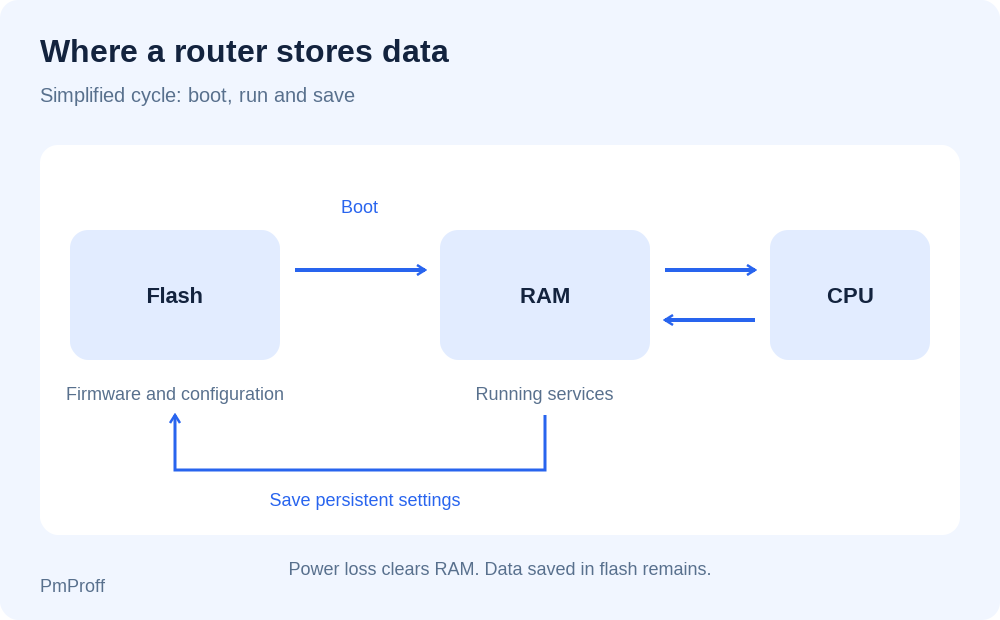
RAM and flash memory serve different purposes in a router. The system and its services use RAM while they run. Flash stores firmware and persistent data. Adding the two capacities gives no useful measure.
More memory can provide headroom for additional functions. It cannot, by itself, increase the speed of your internet plan, radio link or processor. Start with what the router needs to do.
What RAM and flash store
| Memory | Primary role | After power is switched off |
|---|---|---|
| RAM | Processes, buffers and live service data | Contents are usually lost |
| Flash | Firmware and saved settings | Data is retained |
| USB storage | Additional files or storage, if supported | Does not replace physical RAM |
“512 MB RAM / 128 MB flash” does not mean 640 MB of file storage. Firmware, system partitions and reserved space take up some of the persistent storage. Only one partition may be available to the user, and closed factory firmware may not support installing applications at all.
When RAM may run short
Extra services, long filter lists, many simultaneous connections and certain drivers consume RAM. A shortage can cause processes to terminate or make the router unstable. A reboot alone does not establish that memory ran out: power problems, overheating or software faults are also possible.
Check the system logs and memory use under a realistic load. Compare the base configuration with the extra services enabled, then disable them one at a time. Counting connected phones tells you little without knowing what traffic they generate and what the router itself processes.
What flash capacity means for firmware and updates
A new firmware image must fit its assigned partition. An extensible system also needs space for packages and their dependencies. OpenWrt explains the limitations of devices with little RAM or flash in its guide to 8/64 devices. Its recommendations apply specifically to that platform. Factory firmware can have different requirements.
Avoid an unsupported firmware release just because its image is smaller. Check current support for your exact hardware revision. Routers sold under the same product name can have different processors, memory or recovery procedures.
Why temporary files matter
Some systems keep their temporary directory in RAM. For example, OpenWrt uses tmpfs for /tmp: a large file there takes up RAM, rather than free space on flash. See the file system documentation.
This matters when diagnosing problems, downloading a firmware image or collecting logs. Before storing large files on a router, check where the system writes them and whether they survive a restart.
Why 1 GB of RAM does not guarantee fast VPN throughput
VPN throughput also depends on the processor, algorithms, software implementation and test conditions. The radio limits Wi-Fi throughput, while port speed can limit local file transfers. Additional memory helps only when memory is the bottleneck. Consider it alongside LAN speed and results from a representative test.
Before installing a larger firmware image or one intended for a different revision, confirm compatibility. Back up your settings and establish how to recover the device before changing its firmware.
What to check before choosing
- List the functions you need: routing, VPN, filtering and additional packages.
- Confirm RAM, flash and the exact hardware revision.
- Check which software is supported and what it requires.
- Find out whether the manufacturer supports extending the system.
- Check memory headroom under load as well as immediately after startup.
Processor, OpenWrt and VPN
CPU core count and clock speed describe only part of the platform. Four 2 GHz cores do not guarantee a particular VPN throughput. The algorithm, implementation, acceleration and test mode all matter. If a listing mentions OpenWrt, check the version, support for the hardware revision and whether it is a factory-customised build.
OpenVPN, WireGuard, IPsec, L2TP or PPTP support does not imply identical client and server capabilities. Check the role, authentication, available settings and compatibility with the other endpoint. An obsolete protocol’s presence in the list is no reason to choose it. Compare performance using the same workload rather than the maximum Wi-Fi speed on the box.
Frequently asked questions
Can I add USB storage to get more RAM?
USB can add storage if the firmware supports it. It does not add physical RAM or necessarily improve performance.
Why is less flash space available than advertised?
Firmware, system partitions and reserved space use some of the flash. Distinguish the physical capacity from the space available to the user.
How much RAM is enough at home?
There is no single figure. A basic router and one running several extra services have different requirements. Check the supported firmware and your planned workload.
In brief
RAM supports active workloads. Flash stores the system persistently. Choose enough headroom for the functions you need rather than assuming more memory always means more speed.