
Specifications and technology / Video surveillance
A camera’s image sensor converts light into an electrical signal. Its format, pixel count and operating characteristics affect the result. Image quality also depends on the lens, lighting and processing.
Two cameras with the same megapixel count can render movement and low-light scenes differently. Compare the complete systems performing the same task.
How light becomes an image
Light passes through the lens and reaches the photosensitive elements. The signal is read, digitised and processed. The camera reconstructs colour, reduces noise, corrects the image and encodes the video. For an overview, see Axis’s introduction to image sensors.
CMOS identifies a technology. Modern CMOS cameras can differ in pixel size, noise, readout speed, processing and exposure modes. The word “CMOS” in the sensor specification tells you little about how two cameras compare.
What does 1/2.8 inch mean?
The fractional-inch designation is a historical name for an optical format. It is not the sensor diagonal in inches, so multiplying 1/2.8 by 25.4 will not give the sensor’s physical size. For the origin of the designation, see Basler’s guide to imaging systems.
For a precise comparison, look for the active width and height or pixel size in the sensor or camera documentation. Check whether your chosen mode uses the entire active area or crops it.
Larger area with the same pixel count
At the same pixel count and aspect ratio, a larger active area gives each pixel more area. This geometric relationship alone cannot predict night-time performance. Sensor design and optics also affect light collection.
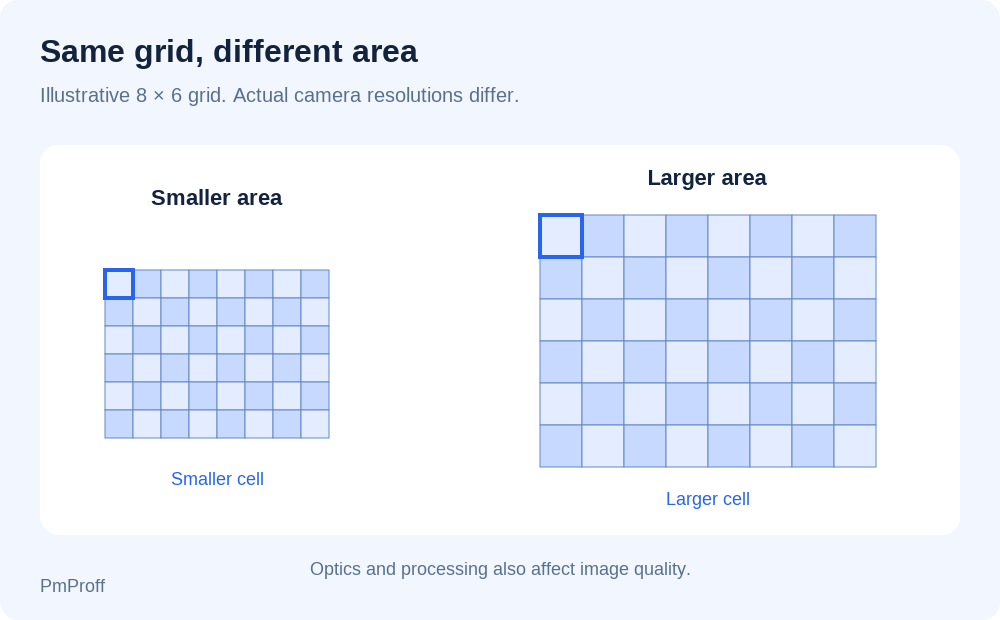
Which specifications to compare together
| Parameter | What it tells you | What else to check |
|---|---|---|
| Sensor format | Physical size class | Active area and lens |
| Megapixels | Number of picture elements | Detail in the target area |
| Pixel size | Geometry of the photosensitive grid | Sensor technology and signal processing |
| Shutter speed | Exposure time | Motion blur and available light |
The same focal length can yield different fields of view with different active sensor areas. Compare the actual viewing angles in the data sheets for your scene. See the camera lens guide.
Rolling shutter and motion blur
With a rolling shutter, rows are exposed at slightly different times, so a fast-moving object can appear distorted. A global shutter exposes all pixels simultaneously, but a long exposure can still cause motion blur. For the difference between geometric distortion and motion blur, see Axis technical guide.
The effect may be less noticeable in a static view than with traffic or fast-moving machinery. Evaluate the intended scene rather than assuming that one shutter type is always preferable.
Why a bright still frame can mislead
A long exposure brightens a stationary low-light scene, but a person moving through it may blur. Strong noise reduction can also erase fine detail. Ask for footage with movement, a comparable field of view and known settings. A still photograph of an empty yard is a poor test.
A lux figure alone does not establish that a camera can see in total darkness. Check the measurement conditions, exposure time, aperture and use of illumination. See the guide to night-time imaging.
Checks before choosing
- Define the distance, scene width and detail you need.
- Compare the sensor, lens, resolution and frame rate together.
- Test moving subjects under the worst expected lighting.
- View an export of the main stream rather than the preview.
- Compare cameras with similar fields of view and known settings.
Frequently asked questions
Is a larger sensor always better?
It can provide useful headroom, but the optics, pixel count and processing also affect results. Compare the cameras in the intended scene.
Do more megapixels mean better night-time images?
No. Megapixels measure resolution. They do not indicate how much light is available or how noisy the image will be.
Is the sensor model enough to judge a camera?
No. Two cameras with the same sensor can have different lenses, processing and settings. Test the finished camera.
In brief
Select a camera for the image it delivers in the area you need to see. Compare sensor size, pixels, optics and moving subjects together.