
Specifications and technology / Video surveillance
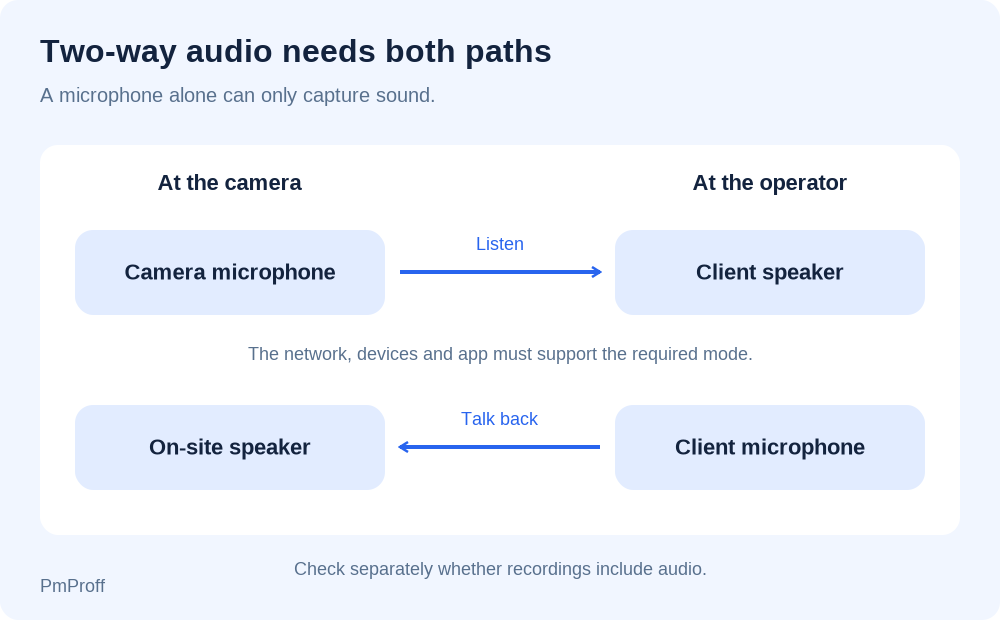
A camera microphone lets you hear the scene, but it does not necessarily let you talk back. Two-way communication needs a return audio channel, a compatible app and a device that can play sound at the camera.
When comparing cameras, distinguish recorded audio, live listening and conversation. Support for one function does not establish support for the others.
Microphones, inputs and outputs
| Specification | Meaning | What to check |
|---|---|---|
| Built-in microphone | Sound source inside the housing | Whether audio is enabled in the stream and the recording |
| Audio input | Connection for an external source | Microphone level or line level |
| Audio output | Sends audio to an external device | Whether an amplifier is required |
| Built-in speaker | Plays audio on site | Talkback support in the intended client |
Identical connectors can carry different types of signal. For example, the AXIS D4200-VE manual describes the audio input modes separately. Avoid connecting a passive speaker to a line output unless the documentation specifies the necessary amplification.
Simplex, half-duplex and full-duplex
Simplex carries audio in one direction. Half-duplex supports both directions in turn, as with a push-to-talk button. Full-duplex supports simultaneous transmission and reception. Available modes depend on the device. See Axis’s description of audio modes.
Test “two-way audio” in a real conversation. Do you have to hold a button? Can you hear the other person while speaking? Does talkback work through the NVR as well as the camera’s own app? A speaker icon alone cannot answer these questions.
Live sound works, but recordings are silent
Check the audio source, stream type and recording settings. The HiLook NVR manual lists audio recording as a separate setting. Hearing the camera live is only one part of the test.
Export a short clip and open it in a compatible player. Check the audio codec and client support. When mixing brands, working ONVIF video does not establish that talkback works. Profile T includes conditional two-way audio capabilities. Check that the device and client both support the required functions.
What causes echoes and feedback?
The microphone can pick up the speaker’s output. High volume and placing the devices close together can make this worse. Some models lack echo cancellation. For example, the AXIS C3003-E manual describes this limitation and the need to change placement if feedback occurs.
Test at normal volume and a typical speaking distance. Assess wind, traffic noise and network latency separately. Testing two phones beside the camera does not reproduce normal remote conversation.
Checks before buying and commissioning
- Decide whether you need recording, live listening or conversation.
- Check the microphone, output, amplification and speaker.
- Confirm that your NVR and app support the function.
- Check the app’s microphone permission.
- Listen to a recording and its exported file.
Enable audio recording deliberately. Avoid recording unnecessary areas and restrict access to recordings. Check separately whether recording is permitted at your site. This guide covers the technical signal path.
Frequently asked questions
Does every camera with a microphone support talkback?
No. A reply requires a return channel and a suitable audio output or built-in speaker.
Can I use any external microphone?
No. Check the input type, signal level, power requirements and connector in the documentation.
Why is there a talk button but no audible sound?
Check microphone permissions, the selected channel, client support, output level and playback device.
In brief
Test the complete audio path for every mode you need: live listening, conversation and playback of recordings. A microphone specification alone cannot establish that all three work.