
Specifications and technology / Intruder alarms
Choose a motion detector for the room and the paths people take, as well as its maximum range. A PIR detector responds to changes in infrared radiation across its detection zones. A dual-technology model adds another way to confirm motion, but correct installation remains essential.
What the detector senses
A PIR detector senses changes in the thermal pattern. It does not photograph or identify a person. In MotionProtect Plus, a microwave sensor checks PIR triggers to filter out some sources of interference. See the Ajax manual. Other dual-technology detectors may use different algorithms.
How to read the specifications
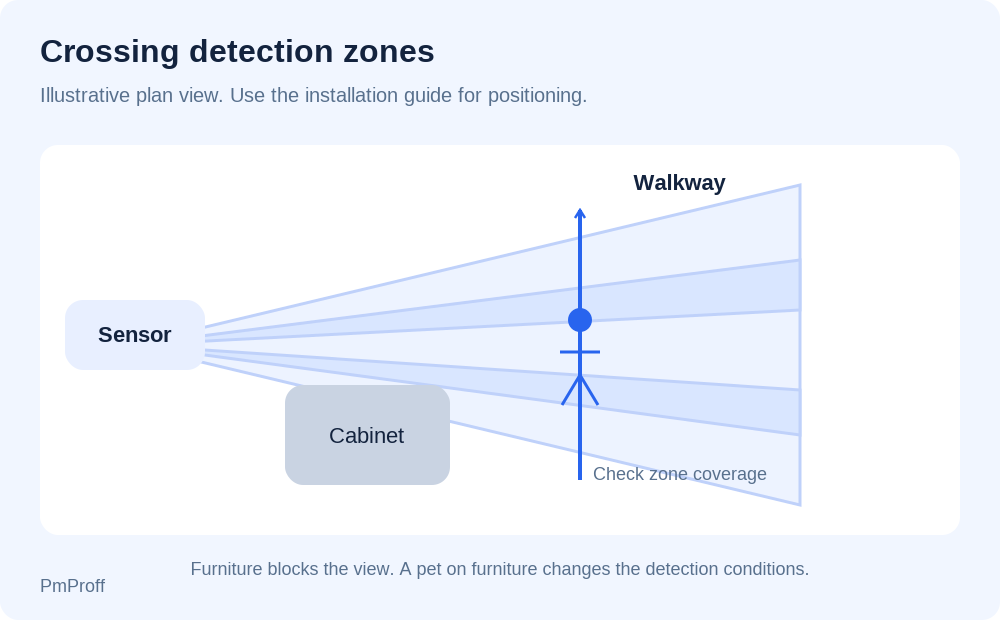
The detection angle describes coverage. Range is specified under the manufacturer’s test conditions, and mounting height affects zone geometry. A long range is of little use if a cabinet blocks the passage. For a room with two entrances, plot both routes and check that someone entering reaches the monitored zone before reaching valuables.
| Parameter | What to check |
|---|---|
| PIR / dual technology | Sensing principle and confirmation logic |
| Range and angle | Actual walking routes and obstructions |
| Pet immunity | Installation conditions and pet size |
| Compatibility | Hub, protocol and device version |
Why a cat can trigger an alarm
Pet immunity applies under the manufacturer’s specified conditions. Weight alone is insufficient. A pet on the floor and the same pet on top of a cabinet present different conditions. Avoid pointing the detector where a pet can climb close to the lens. Check size limits, mounting height and sensitivity together.
Use a walk test rather than waving a hand
After installation, walk the usual route from each door and along the edge of the detection area. Test with the doors closed and furniture in its normal position. Ajax recommends testing detection coverage and radio signal separately: a delivered notification proves that a message arrived, but does not confirm coverage of the intended passage.
When to reposition the detector
If the detector covers the centre of the room but misses the entrance, reconsider its angle or the number of detectors before increasing sensitivity to the maximum. Use an outdoor-rated model outdoors. An overhang does not make an indoor detector suitable for outdoor conditions. A window may also need a separate opening contact.
Checks before choosing
- Compare room conditions with the data sheet.
- Test every entry route, including areas away from the lens.
- Repeat the test after moving furniture.
Photo verification and privacy
Photo verification provides still images to help assess an event. It does not provide continuous video. “On alarm” takes images in response to a supported alarm. “On demand” requires a compatible model and user permission. Taking photos by scenario, on a schedule or when the system’s armed state changes are separate capabilities.
Ajax explains Photo on Demand and access permissions. Before choosing a model, check the compatible hub, firmware, supported events and who can request and view photos. The term “photo verification” alone does not confirm every mode. Agree on detector placement and room privacy with the users.
Sensor type, detection angle and photo verification
PIR, microwave and dual technology describe different motion detection arrangements. Read the detection angle alongside the diagram and mounting height. It does not specify the acoustic coverage of a glass-break detector. Photoelectric smoke sensors, chemical CO sensors, humidity sensors and capacitive keypads are distinct technologies.
Photo verification supplies images for checking an event. Photos taken on alarm, on demand, by scenario or on schedule have different conditions and permissions. Check support in both the detector and hub. These images do not provide a continuous video archive. Check who can request photos, how they are delivered and what remains available if the connection fails. If the catalogue gives an ambiguous sensor type, verify the exact model first.
Frequently asked questions
Is a dual-technology detector always better?
It can help in suitable conditions. The choice depends on the scene, installation and logic of the particular model.
Can a PIR detector see a person through a wall?
Do not rely on it. The intended passage must lie within the manufacturer’s specified field of view.
Is a rating of “up to 20 kg” enough?
No. Also check pet height, access to furniture and the mounting rules for your detector.
In brief
Identify the passage you need to monitor, choose a suitable sensing technology and test the detector in the actual room.