
Specifications and technology / Networking
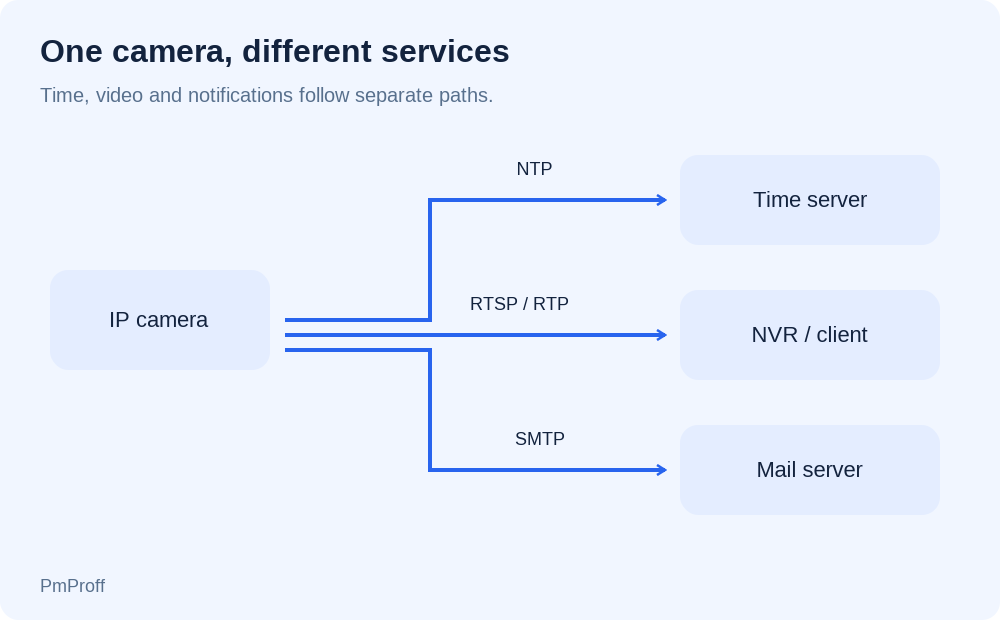
A long protocol list says little about camera quality. Each name describes a task such as obtaining an address, locating a server, synchronising time or delivering video or events. Choose the functions you need and confirm support at both ends.
Addresses, names and time
IPv4 and IPv6 define network addressing. DHCP can supply network settings, DNS resolves names to addresses and NTP synchronises clocks. These services work independently. A camera may be reachable by IP address yet unable to find its cloud server by name. Axis’s network settings documentation lists these settings separately. An incorrect clock makes recorded events harder to find. Check camera and recorder clocks, time zones and time sources. NTP in the Axis documentation.
Stream control and video transport
RTSP controls streaming sessions, RTP carries media and RTCP carries session control information. TCP and UDP are transport protocols. RTSP support alone does not establish support for every analytics event, configuration function or two-way audio. For integration, also check ONVIF profiles, codecs and client capabilities. Axis explains how a streaming session is established. RTMP matters for compatible streaming applications. Its presence does not improve the quality of local recordings.
| Task | Examples |
|---|---|
| Address and name | IPv4/IPv6, DHCP, DNS |
| Time | NTP |
| Video | RTSP, RTP, RTCP |
| Web communication | HTTP/HTTPS |
| Events and monitoring | SMTP, SNMP, HTTP POST |
Web access, events and monitoring
HTTP and HTTPS support web communication. HTTPS adds TLS protection. SMTP can send email, FTP can transfer files and SNMP can support monitoring. HTTP POST may deliver an event to a compatible server. Check supported versions, authentication and message format. Verify a test email, file or event at the receiving end. A menu option alone cannot confirm that the service will accept the data.
Other names in the list
ICMP carries network control messages. IGMP manages multicast group membership. QoS prioritises traffic without increasing link capacity. DDNS updates the association between a name and a changing address, but cannot by itself make a device reachable through any NAT. PPPoE applies to connections that use it. 802.1X controls network access. Enable UPnP only after assessing the need and your network security policy.
Limit exposure of services
Start with a local connection and the functions you need. Change default credentials, check update support and review user permissions. Plan a separate, secured path for remote access. Axis’s hardening guide recommends managing available services and reducing exposure. Follow your model’s instructions when applying that principle. Jeweller, Wings and NOVA refer to alarm systems and have different purposes from IP video protocols.
Checks before choosing
- Define the required result: stream, event or control.
- Match camera and client capabilities.
- Check time and DNS separately from video.
- Disable unnecessary services in line with network policy.
Frequently asked questions
Does RTSP mean full NVR compatibility?
No. Check events, audio, codecs and control separately.
Do more protocols mean a better camera?
No. Look for the functions your use case needs.
Does DDNS automatically make a camera reachable from the internet?
No. Addressing, NAT, access and security are separate considerations.
In brief
Read the list as a set of services. For each one you need, verify that the result reaches its destination.