
Specifications and technology / Video surveillance
An alarm input receives an external device’s state. An alarm output controls an external response. An event rule determines the action: record a clip, send a notification or activate the output. The terminals alone do not establish that a particular scenario will work.
An input carries a signal
Alarm In may expect contact closure or another specified electrical signal. Check the input type, allowed levels and wiring diagram in the manual. A sensor using 12 V power does not imply that you can apply that voltage to the input. The sensor’s power supply and signal contact may be separate circuits.
Camera outputs vary
The AXIS P1447-LE manual describes an open-drain transistor output with specific limits. Other devices use relays. An Alarm Out label does not guarantee a dry contact or the ability to drive a siren directly. For relay operation, see the guide to NO, NC and COM.
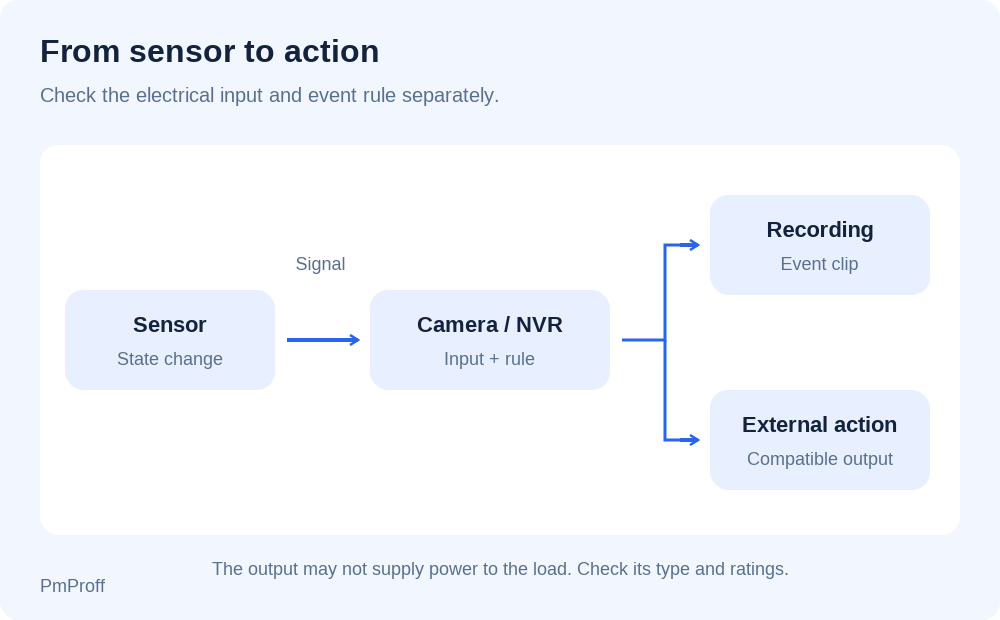
| Stage | Check |
|---|---|
| Sensor | Signal type and power requirements |
| Input | Compatible electrical mode |
| Rule | Condition, schedule and action |
| Output | Type and permitted load |
Example event sequence
A warehouse door contact changes the input state. The camera or recorder logs the event, saves the required clip and notifies the responsible person. If an external indicator is required, select its circuit separately. Set the schedule, response duration and behaviour on repeated activation.
Testing reception and testing the rule
First confirm that the interface shows the input changing state. Then test the action itself: recording, notification or output. For an example of event rules, see the AXIS P1467-LE manual. Menu names and support for forwarding events to a third-party NVR depend on the equipment.
Testing fault conditions
A disconnected sensor, a restart and a network outage may all produce different results. Agree which faults the system must report. If you need open- or short-circuit supervision, check for that input function explicitly. An NC label alone does not establish it. For an alarm application, test the complete system as well as the recording.
Checks before choosing
- Compare the input and sensor wiring diagrams.
- Check the state in the menu and play back the actual recording.
- Test recovery after a restart.
Frequently asked questions
Is Alarm Out a 12 V output?
Not necessarily. It may be a contact or a transistor output.
Can a sensor work without an NVR?
If the camera has a compatible input and suitable event logic, some scenarios can operate without a recorder.
Does NC guarantee detection of every fault?
No. Line supervision depends on the electrical circuit and the capabilities of the input.
In brief
Test the signal, compatible input, rule and actual result. Select the output by its electrical specifications.