
Specifications and technology / Equipment installation
The 19-inch designation describes the mounting format. The cabinet itself is wider. Height in U describes mounting space, but equipment must also fit within the available depth and load rating, with room for its cables.
What is a rack unit?
One rack unit is 44.45 mm of mounting height, as explained in Eaton’s guide to racks. Start your layout by adding the heights of devices, shelves, cable managers and patch panels. The standard mounting pitch and the actual height of an enclosure can differ slightly by design.
Outside depth and usable depth
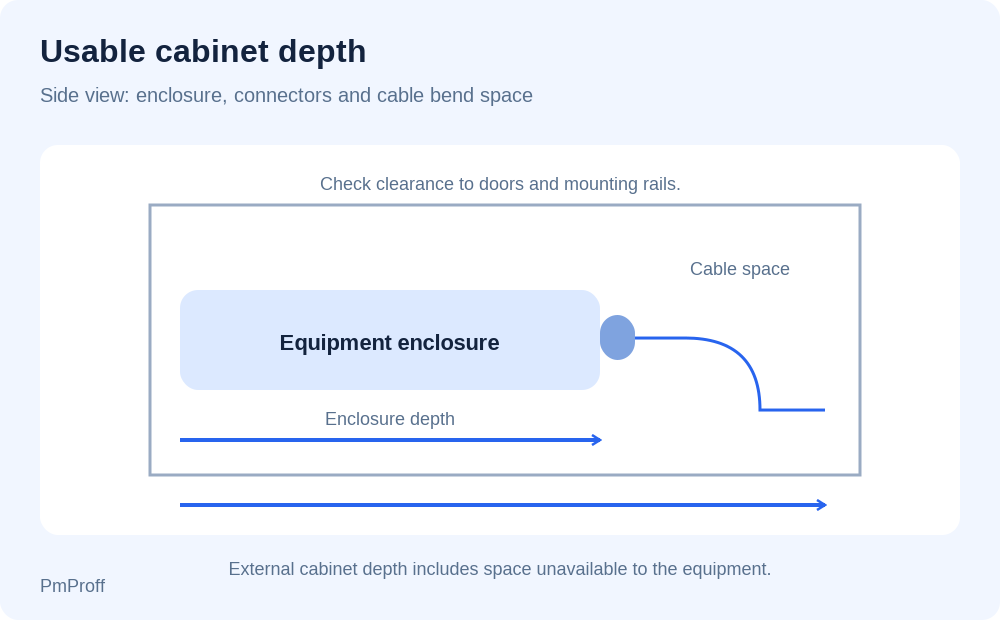
Allow for the distance between mounting planes, space in front of the panel and clearance behind the rear connectors. Cables need room to bend without excessive strain, and the doors must close without pressing on plugs. Eaton’s rack configuration guide covers depth, cable clearance and cooling as separate considerations.
| Parameter | What to check |
|---|---|
| U | Total rack units required |
| Depth | Enclosure, connectors and cable bends |
| Load | Cabinet, rails and supporting structure |
| Ventilation | Air intake and exhaust |
Weight and mounting method
Check the load ratings of the cabinet, shelf or rails and the suitability of the wall or floor fixings. If the manufacturer specifies rails for a heavy UPS, its front mounting ears alone cannot support it. Use mounting hardware compatible with the equipment. Use the installed weight rather than the shipping weight.
Plan the airflow path
Find out where each device draws air in and where it exhausts it. Keep cables and adjacent equipment clear of the vents. Empty rack units alone cannot guarantee cooling. Measure the temperature near the intake under operating load as well as the room temperature near the door.
Example layout for a small installation
For a switch, NVR and patch panel, start with a vertical layout. Check the deepest device with its cables attached, the location of the power strip and access to the drives. Allow a realistic margin for expansion. Before buying, ask for a cabinet drawing with usable dimensions in addition to the photograph and U rating.
Checks before choosing
- Plan equipment positions in rack units.
- Check usable depth with cables connected.
- Check supports, weight and airflow direction.
Metal thickness and rail adjustment
The frame, crossmember and vertical rail each have their own material thickness. The thickness of a front door, rear door or side panel cannot tell you the permissible server weight. Use the load ratings in the cabinet and shelf data sheets. A single sheet-metal thickness is insufficient to calculate the load capacity.
Rail adjustment increments determine the available steps in rail spacing. Check the distance required by the equipment rails, the adjustment range and cable clearance. The outside depth of a cabinet is different from the spacing between rails. Rittal lists load capacity and rail adjustment separately. Compare like-for-like static load ratings, taking the supports and mounting method into account.
Form factor, shelves and power strips
The 19-inch form factor describes compatibility with a rack system. It also applies to shelves, fans, blanking panels and cable managers. The number of positions on a cable manager is separate from the Ethernet port count. On a PDU or power strip, a port count may refer to power outlets. Check the outlet type and total load rating.
The cabinet, an individual shelf and each fixing have separate load limits. Use each weight rating only for the component it describes. Account for weight distribution and mounting conditions. A camera bracket has its own data sheet and cannot be assessed using the criteria for a 19-inch shelf. A microSDXC entry in a form-factor field refers to a memory card rather than rack equipment.
Frequently asked questions
Does “19-inch” specify the outside width of the cabinet?
No. The number describes the mounting format. The cabinet enclosure is wider.
Will a 1U device fit in every cabinet?
It needs one rack unit of height. Depth, mounting hardware and weight must also be compatible.
Can I install a desktop NVR in a cabinet?
Yes, if the shelf is compatible and the load rating, depth and ventilation are sufficient.
In brief
In addition to rack units, allow for usable depth, supports, cable clearance and unobstructed airflow.