
Specifications and technology / Audio
Music and announcements in a shop, office or corridor often need several loudspeakers on one line. A 70/100 V system simplifies audio distribution, provided the components are compatible and the load is calculated correctly.
What is a 70 V or 100 V line?
This rating describes an audio amplifier output. Never apply mains power to a loudspeaker. The signal varies with the audio, and the figure designates the nominal line voltage. Compatible speakers have a matching transformer or a suitable input specified by the manufacturer. Yamaha’s guide to connecting amplifiers distinguishes low-impedance and high-impedance modes. Never connect an ordinary 4 or 8 ohm loudspeaker directly to a 100 V output. Audio line voltages can be hazardous. Follow the manual, isolate power before installation or changing connections and involve a qualified professional where necessary.
Power taps: the load each loudspeaker presents
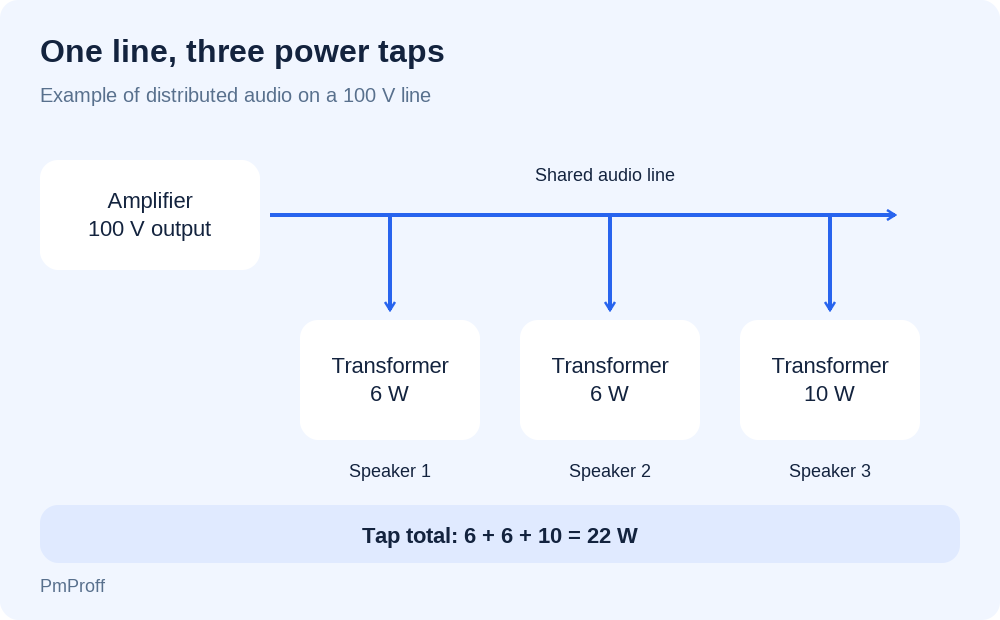
The selector or transformer taps set a loudspeaker’s rated power on the selected line. Two speakers set to 6 W and a third set to 10 W give a calculated load of 22 W. Add the selected taps rather than the maximum wattages advertised for the enclosures. Use the tap values for the actual 70 V or 100 V mode, as the tables may differ. The diagram shows one line branching to speakers and omits terminal and cable wiring details.
| Check | Purpose |
|---|---|
| 70/100 V or low-impedance output mode (ohms) | Match the amplifier and load |
| Tap settings on each loudspeaker | Calculate the total load on a channel |
| Number of independent channels | Determine zoning options |
| Inputs and announcement priority | Check music and microphone operation |
Choosing an amplifier and allowing headroom
The sum of the taps on a channel must stay within its load rating. Allow extra headroom for operating conditions and possible expansion, using the amplifier manufacturer’s recommendation. A blanket “add 20%” rule does not apply to every model. For example, the Yamaha XH150 manual calculates its model’s load by adding speaker power ratings. Document the selected taps, the lines that operate simultaneously and the headroom on each channel. A multichannel amplifier’s total power may not be available at a single output.
Amplifiers, mixers and controllers
A power amplifier drives a passive load. A mixer combines sources and adjusts their levels. A mixer amplifier does both. Both product types are illustrated in the Yamaha MA/PA range. A controller or audio router can manage zones without providing amplified speaker outputs. The device type “controller” alone does not mean it can drive passive speakers directly. Check the block diagram and output specifications.
Loudspeaker types, zones and compatibility
Ceiling, wall-mounted and horn speakers describe designs and applications. Electrical compatibility is a separate question. A passive speaker may be low impedance or designed for a distributed line. An active speaker has its own amplifier. For zoning, check whether groups can only be switched independently or can also have separate sources and levels. Two outputs may carry the same programme. Consider intelligibility, coverage, cable length, environment and mounting. A background audio system with a microphone does not automatically qualify as a fire alarm voice evacuation system. That application requires an appropriate design and approved components.
Checks before choosing
- Record the output type and power rating of each channel.
- Check that every speaker supports the intended line.
- Add the selected tap ratings and allow the manufacturer’s recommended headroom.
- Check requirements for independent zones, microphone priority and backup.
- After installation, test coverage and intelligibility at a low sound level.
Zones, input voltage and power
On a passive speaker, 70/100 V designates a compatible audio line. Never connect it to the mains. Settings such as 3/6 W or 5/10/20 W may refer to transformer taps selected according to the data sheet. Check actual settings and amplifier headroom before adding ratings.
On a microphone, controller or amplifier, the zone count refers to announcement routing. Independent zone control does not necessarily provide a separate amplifier for each zone. For “120 W × 6”, check channels and operating modes instead of treating it as a single output. Audio zones are distinct from security partitions and fire alarm loops.
Frequently asked questions
Does a 100 V speaker plug into a wall outlet?
No. This is an audio line rating. Never connect the speaker to mains power.
Can speakers of different wattages share a line?
Yes, provided they support the line and the sum of the selected taps and all other conditions meet the system specifications.
Will more watts fix unintelligible announcements?
Not necessarily. Speaker placement, room acoustics, directivity, speaker count and settings all matter.
In brief
In distributed audio, match the line type first, then total the selected taps on each channel. Check the electrical arrangement regardless of enclosure type or zone count.