
Specifications and technology / Video surveillance
Video analytics answers a specific question: what appeared, which boundary did it cross, or where did it linger? The word “Smart” does not mean a camera can do all of these things simultaneously. Choose the scenario you need, then test it at the installation site.
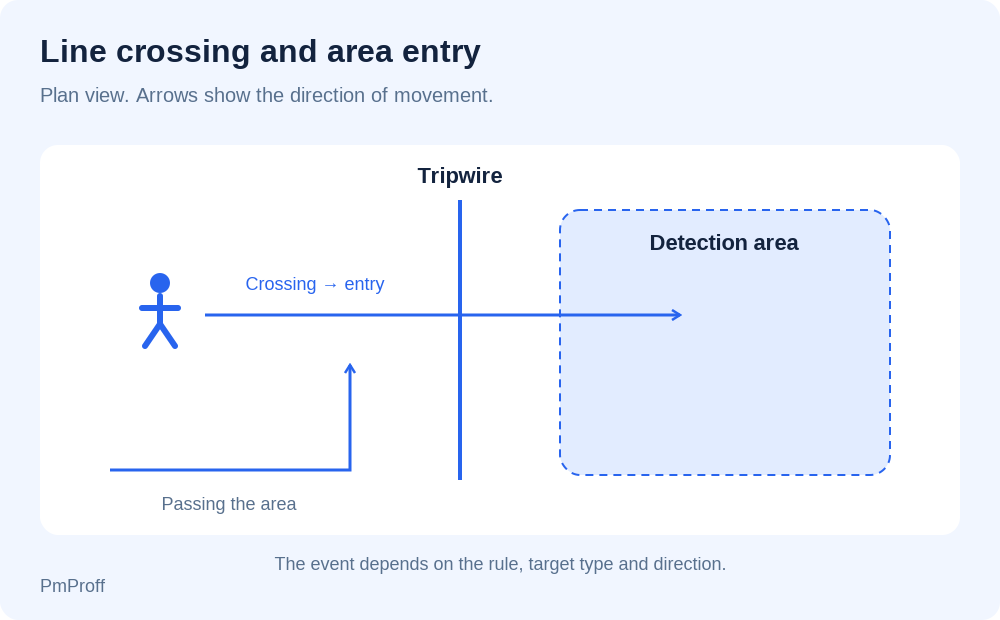
For a shop entrance, you may want to detect passage through the door. For an enclosed yard at night, you may want to detect a person anywhere within a zone. The two scenes may need different settings.
Motion, classification and events
| Function | Question | Practical example |
|---|---|---|
| Motion detection | Has the scene changed? | Start recording after motion |
| Object classification | Is it a person or a vehicle? | Select relevant targets |
| Line crossing | Has the object crossed a boundary? | Entry through a gate |
| Area event | Was a condition met within the area? | A person enters or lingers |
Event names and conditions vary by manufacturer. One product may let you choose the crossing direction, while another may also support a dwell time. For examples of scenarios and limitations, see the AXIS Object Analytics manual. It describes one implementation. Other cameras may offer different features.
Face detection and identification
A camera may locate a face in the frame or save a cropped image without comparing it with a database of people. Likewise, detecting a vehicle does not mean reading its number plate. Before buying, ask to see the actual output you need: an event, a snapshot, plate text or a match against an approved list. For an overview, see Axis’s guide to detection and recognition.
Why a good camera can miss events
The person must be sufficiently visible in the image. Branches blocking the view, strong glare, noise and an unsuitable angle make classification harder. Minimum object sizes specified for one system may not apply to another. Check the mounting height and target area first, then configure the rules.
Before placing a line close to the edge of the frame, test crossings from both sides. Walk through at near and far distances, slowly and quickly, by day and at night. Log missed events as well as successful alarms so you can assess both.
From event detection to recording and notification
Analytics can run on a camera, recorder or server. Check where it runs, how many channels it supports and whether enabling several functions simultaneously imposes limits. Test the entire sequence: the event occurs, the recorder receives it, the required clip is saved and the notification arrives.
With equipment from different manufacturers, verify metadata transmission separately. ONVIF Profile M covers analytics events and metadata, but both endpoints must support the specific function. See the guide to ONVIF and RTSP (in Ukrainian).
Checks before accepting the system
- Define a specific event that the system must detect.
- Mark the line or zone and select the target types.
- Test the daytime and night-time scene, including false detections.
- Open the recorded event as well as the push notification.
- Repeat the test after changing the camera angle, lens or firmware.
Reading a list of smart features
Abandoned or missing object detection looks for a change involving an object in the scene. Scene change, defocus and video tampering concern the quality or integrity of the view. Object counting, crowd detection and heat maps describe activity. A heat map of activity does not measure object temperature. Thermal screening with a thermal imager is a separate function. Metadata describes the analysis results and needs a compatible receiver.
Face detection or capture does not identify a person. Detecting a car does not read its plate. Smart tracking follows a target and may leave parts of the scene outside the current view. For SMD and other proprietary names, consult the manufacturer’s documentation. A shared label does not establish that two products use the same algorithm.
NVR-based analytics runs on the recorder, which has its own channel and mode limits. Check which functions can run together. A feature list does not guarantee every function on every channel. Example of a manufacturer’s supported scenarios. For a combined list, test each required event and check the resulting recording.
Frequently asked questions
Can video analytics replace an alarm system?
A feature list alone cannot establish this. Determine the camera’s role, redundancy requirements and security requirements separately.
Why does the camera sometimes miss a person?
Check target size, visibility and lighting. Simply raising sensitivity without examining the scene may increase unwanted events.
Do both the camera and NVR need analytics?
Not necessarily. Identify which device performs the analysis and which receives the result, then test them together.
In brief
Evaluate video analytics against the event you need to detect and the outcome of an on-site test. A long feature list alone tells you little.