
Specifications and technology / Network equipment
An unmanaged switch is useful when you simply need more ports. Choose a managed switch when you need to separate traffic, monitor links or control network behaviour. Port count and PoE support are separate considerations.
What switch management adds
VLANs, port statistics, logs, diagnostics, loop protection and PoE controls vary by model. TP-Link’s comparison distinguishes unmanaged, web-smart and managed devices. Check the documentation for each required function even if the product is labelled “Smart”.
Why separate cameras from the office network?
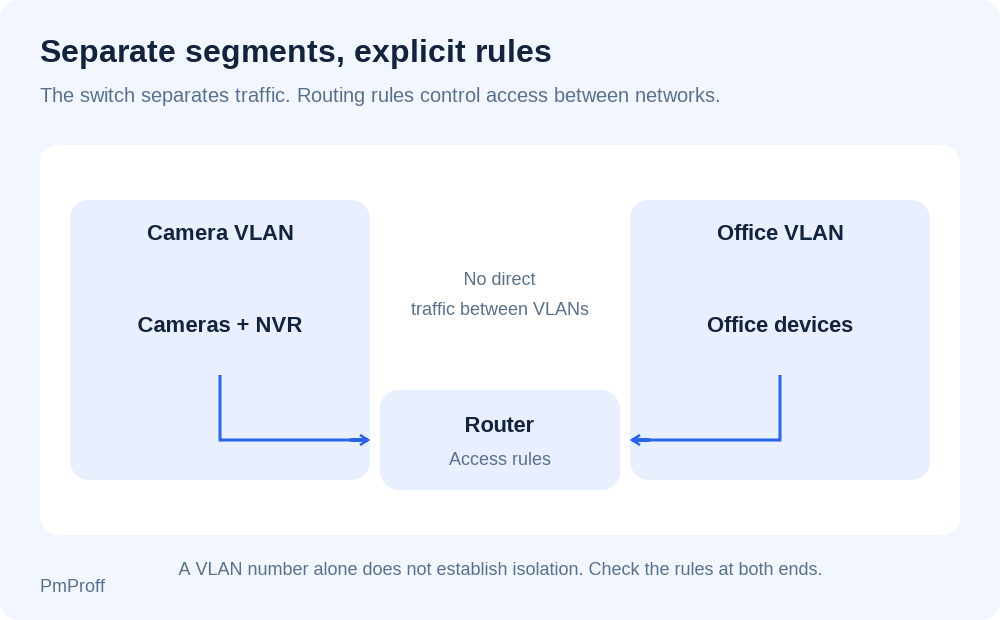
Consider an office with workstations, cameras and guest Wi-Fi. Separate segments can keep guests from accessing the recorder interface while still allowing an administrator to reach it. Define the connections each group needs before assigning VLAN numbers.
| Requirement | What to look for |
|---|---|
| Add ports | Unmanaged or basic switch |
| Separate segments | Required VLAN type |
| Diagnostics | Statistics, logs, port mirroring |
| Power management | Model-specific PoE functions |
VLANs and access rules
A VLAN divides the network into logical segments. A router or device with suitable Layer 3 functions can route traffic between them. Configure permissions between segments separately. For segmentation basics, see TP-Link’s explanation of VLANs. Assigning cameras a different VLAN number alone does not establish that they are protected.
Tagged and untagged traffic between switches
An endpoint may receive ordinary untagged frames while links between network devices carry tagged traffic for several VLANs. The settings at both ends must agree. TP-Link explains tagged and untagged traffic. Before changing the management VLAN remotely, make sure you have a way to regain access.
How to verify the result
Test each requirement individually: the NVR records the cameras, the administrator can open the designated interface, a guest client cannot, and permitted updates and time synchronisation work. Save the configuration and port map. Internet access alone cannot verify isolation within the site.
Checks before choosing
- List the connections permitted between groups.
- Check VLAN settings on every intermediate device.
- Save a configuration backup and a method of local access.
Frequently asked questions
Is every PoE switch managed?
No. Supplying power and providing network management are independent capabilities.
Does a VLAN automatically speed up the network?
No. Segmentation does not increase physical port or uplink speeds.
Do unmanaged switches always block VLAN tags?
Some models pass tagged frames. This does not give them configurable VLANs or port isolation.
In brief
Choose a managed switch for the network rules and diagnostics you need. Check those functions in the specifications.