
Specifications and technology / Video storage
A camera needs a compatible microSD card that can withstand repeated writes as well as hold enough footage. A card with high read speed may still be a poor fit for continuous surveillance recording.
Check camera requirements first, then the required retention period and recording mode. “Up to 256 GB” does not mean every card of that capacity will perform equally reliably.
Start with the camera data sheet
Find the supported card type, maximum capacity, speed requirements and any manufacturer list of tested models. Cameras in the same series can have different limits.
After insertion, the camera usually needs to initialise or format the card. Back up any files you want to keep before formatting, which erases the data. If the instructions call for preparation in the camera, let the device choose the file system. TP-Link requirements and checks.
What speed classes tell you
| Symbol | What it specifies | What it does not guarantee |
|---|---|---|
| C10 | Minimum sequential speed of 10 MB/s under standard test conditions | Endurance over years of recording |
| U1 / U3 | 10 / 30 MB/s classes under the applicable protocol | Compatibility with every camera |
| V30 | Video Speed Class rated at 30 MB/s under standard conditions | A benefit for a camera that does not require this mode |
Speed class specifies minimum sequential performance under defined conditions. The maximum read speed on the packaging describes something different. The SD Association also notes that the host and card protocols must match. Speed classes explained.
Cards commonly list MB/s, while camera bitrates use Mbps. An 8 Mbps stream corresponds to 1 MB/s before overhead. Also allow performance headroom and follow the camera’s requirements.
What High Endurance means
Loop recording repeatedly overwrites memory. Manufacturers offer cards designed for sustained write workloads. Kingston, for example, lists surveillance as an application for its High Endurance range. Kingston technical data sheet.
Endurance ratings vary by brand and model. Compare the stated hours or total data written alongside card capacity, bitrate, temperature and warranty conditions.
How loop recording works
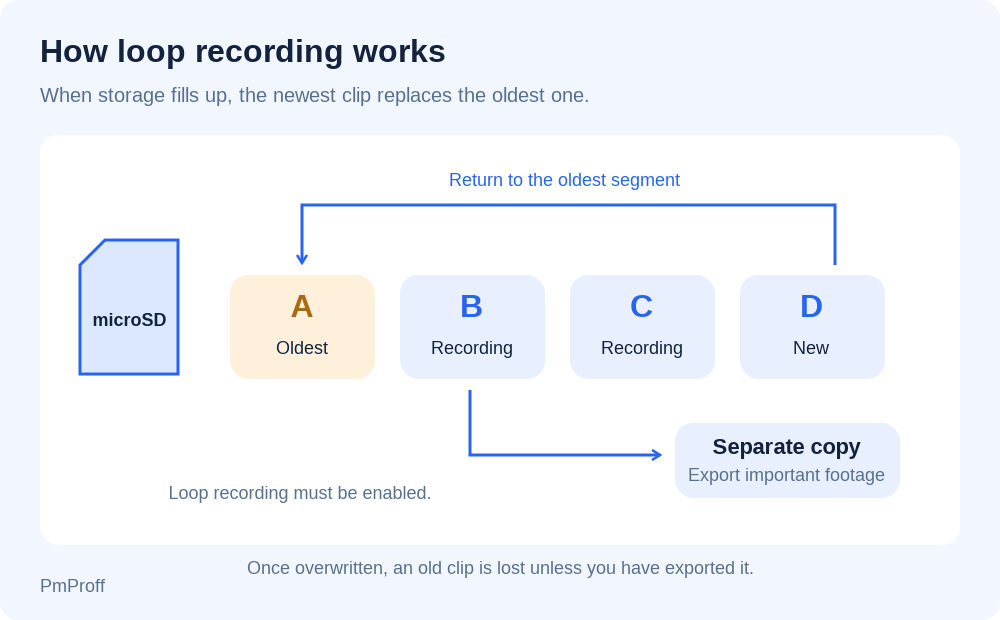
A full card can continue recording by overwriting the oldest data if the camera supports this mode and it is enabled. Otherwise recording may stop. Check the setting before relying on automatic overwrite.
Export important clips promptly. Viewing an event in the app does not create a separate copy of the footage.
How long will 128 GB last?
At a steady 4 Mbps, one camera records about 43.2 GB per day: 4 ÷ 8 × 86,400 = 43,200 MB. A nominal 128 GB would therefore hold about 2.96 days before accounting for overhead, audio and unavailable space.
Three days is not guaranteed. Variable bitrate, event recording and multiple streams change the result. Measure actual daily storage use after setting the required quality.
Damage to or theft of the camera can also mean the loss of its local recordings. Arrange separate storage for important events on a compatible recorder, server or other storage device.
Checks after installation
- Confirm that the camera reports the correct capacity.
- Set the schedule and loop recording mode.
- Record a test event and open the saved clip.
- Export it and check playback on another device.
- Repeat the checks after the card fills and the camera restarts.
- Monitor any storage errors the camera reports.
SDXC, adapters and file systems
microSD refers to physical form factor. SDXC is a capacity standard. UHS-I identifies a bus interface, while U3 and V30 specify minimum sequential performance under their respective standards. These labels describe distinct properties. The SD Association’s guides to bus interfaces and speed classes explain these markings.
SDXC uses exFAT as its standard file system. Prepare the card according to the device instructions. SD Association standards overview. An SD adapter changes the physical connection. It cannot increase write endurance or add host support. Maximum read speed also differs from guaranteed sustained write speed. Check ambiguous Mbps or MB/s units in listings against the manufacturer’s packaging.
An intercom or access terminal may use the card for different data from a camera. Check its purpose, maximum capacity, formatting and export support for the exact model. “Up to 256 GB” gives the supported limit and does not imply a card is included. For a standalone card, 256 GB specifies capacity. Retention depends on recording conditions.
Frequently asked questions
Is a larger card always better?
Stay within the camera’s supported range. More capacity can extend retention, but the card must also be compatible and have sufficient write endurance.
Is C10 enough for every camera?
No. Follow the requirements for the specific camera model and recording mode.
Does recording to microSD require internet access?
It depends on the camera and operating mode. Local recording and remote access are distinct functions. Check how the model behaves offline.
Prioritise compatibility, endurance and verified recordings over peak read speed on the box. Export important footage before it is overwritten.