
Specifications and technology / Networking and power
PoE (Power over Ethernet) carries data and power over a single Ethernet cable. Compatible IP cameras, access points and IP phones can operate without a separate mains outlet at each device.
Check the standard, power available per port, total switch budget and device requirements. A PoE label alone tells you little about compatibility.
How PoE works
A connection has two roles: PSE supplies power and the PD receives it. A switch or separate injector can act as the PSE. A compatible camera is one example of a PD. Connecting an Ethernet cable to a port cannot give the port power delivery capability.
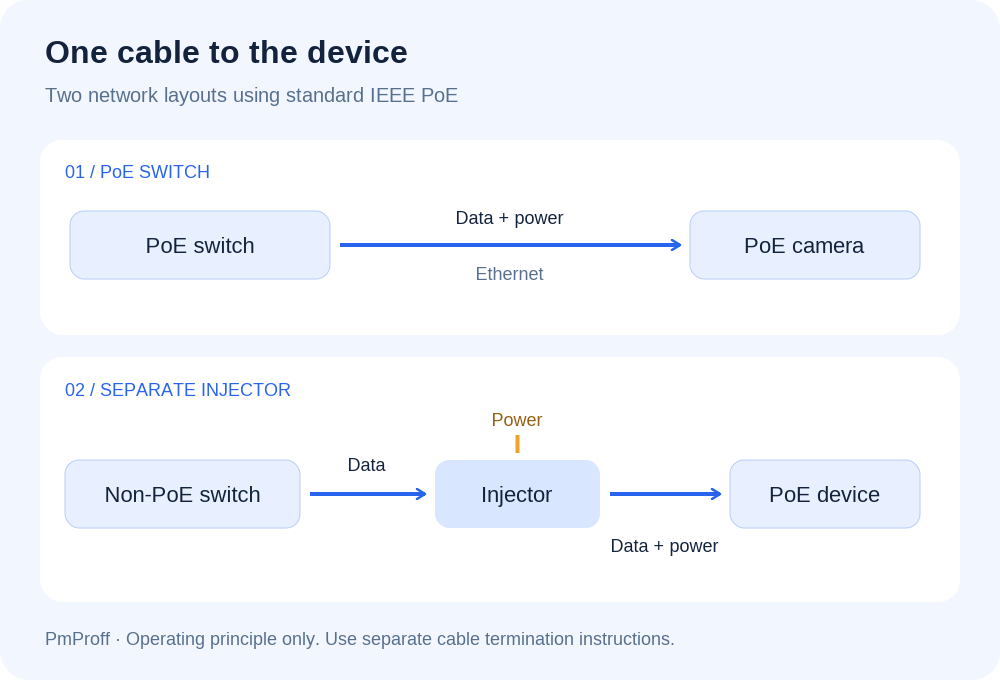
A PoE switch is convenient when connecting several devices. An injector adds power to a single link from a conventional switch. A compatible splitter can sometimes power a device without a PoE input by separating power from data. Its output voltage, connector and power rating must match the device. TP-Link examples.
How 802.3af, 802.3at and 802.3bt differ
These IEEE standards specify power delivery. Check Ethernet speed separately. Cable losses mean that the power available to the device is lower than the power at the switch output.
| Standard and type | Maximum PSE power | Maximum PD power |
|---|---|---|
| 802.3af / Type 1 / PoE | 15.4 W | about 13 W |
| 802.3at / Type 2 / PoE+ | 30 W | 25.5 W |
| 802.3bt / Type 3 | 60 W | 51 W |
| 802.3bt / Type 4 | 90 W | 71.3 W |
These are upper limits for the respective types. Check the class and data sheet for the particular port. A PoE++ label alone does not distinguish between 60 W and 90 W. The figures come from the Ethernet Alliance technical overview (PDF).
Active and passive PoE
Standard IEEE PoE checks the connected device for compatibility before applying operating power. A newer standard can usually power earlier generations if enough power is available. A generic PoE label does not confirm backward compatibility.
Passive systems lack standard IEEE negotiation. Before connecting an unfamiliar adapter, check voltage, polarity and pin assignments in the documentation for both devices. A mismatch can damage equipment.
“24 V passive” and “802.3at” are different specifications. See TP-Link’s comparison of active and passive PoE.
PoE budget: why port count is only part of the calculation
A switch has a per-port limit and a total PoE budget. Eight ports rated at 30 W each do not necessarily provide 240 W in total. The manufacturer may specify a smaller shared power budget.
Plan around how your switch allocates power, whether by class, negotiated request or another supported policy. Idle consumption alone may underestimate the reserve required. Cisco documents the total budget and power management mechanisms separately. Cisco guide.
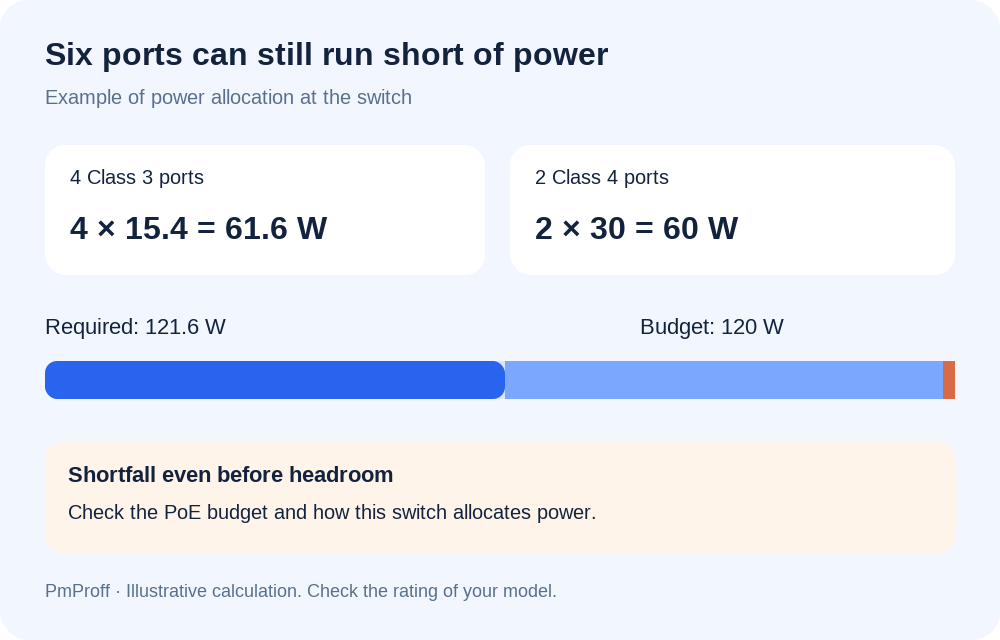
Sizing the switch: check the requirement for each port first, then add them up. Allow for future devices and the peak operating modes in their data sheets. Account for losses when comparing device input power with the source budget.
Cable, distance and speed
A standard copper Ethernet channel typically extends up to 100 m including patch cords. Temperature, conductor size and heat buildup in cable bundles can reduce the permitted length. Fluke Networks explanation.
Choose good-quality cable of the appropriate category and conductor size. Copper-clad aluminium (CCA) is not equivalent to solid copper for PoE. Electrical resistance and link quality matter. Fluke Networks on CCA.
Check the speeds of the port and injector separately. A high PoE power rating does not establish support for 2.5 Gbps. For an access point with a fast uplink, every component in the path must support the required speed.
How to read a product specification
The label «802.3af/at» should be read alongside the power specifications. On an access point it may describe how the unit receives power. On a switch it may describe how it supplies power. PoE In means a power input, and PoE Out means an output. A device may have one without the other.
- Find the exact model and its PoE input requirements.
- Match the standard and the power available at the source port.
- Calculate the shared budget for all connections.
- Check the cable’s speed rating, length and specifications.
- Check what is included. The injector or power supply may be sold separately.
Some access points start on limited power but disable certain features. Check maximum consumption and supported operating modes even if the label says “powered by PoE”. Cisco access point power mode examples.
Pin assignments and PoE port count
The pinout identifies which contacts carry power. Specifications may list groups 1,2 / 3,6 or 4,5 / 7,8. Do not change polarity or apply voltage manually on that basis. Standard PoE checks the connected device. Passive PoE requires an exact match in voltage, polarity and pinout.
802.3af/at use two pairs for power. 802.3bt also supports four-pair power depending on the type and class. Ethernet Alliance distinguishes between two-pair and four-pair modes. This overview is unsuitable as a wiring diagram for cable termination or a homemade injector.
“PoE output ports” identifies the ports that supply power and often lists their Ethernet speed. An uplink may carry data only, so the PoE port count can be lower than the total port count. Even on an eight-port switch, the shared budget may be insufficient for eight simultaneous maximum loads.
Frequently asked questions
Can I connect a conventional device to a PoE switch?
A standard IEEE PoE port can generally accept an ordinary Ethernet device because it checks compatibility before applying operating power. Passive PoE and forced, non-standard power require separate checks.
Will a 30 W injector deliver the full 30 W to the device?
No. Under 802.3at, up to 25.5 W is available to the device after channel losses. Check compatibility and the specific class in the documentation.
Will PoE work in a power cut?
PoE itself provides no backup power. The switch or injector needs a backup supply, as do the other network nodes required for internet access. Runtime depends on the backup source and load.
Why will my camera or access point not start?
Check the port, supported standards, per-port limit, total budget, cable and PoE configuration. Avoid trying a random passive adapter to troubleshoot an unknown connection.
Match the standard, per-port power, total power budget and cable. These four checks tell you far more than a PoE label alone.
Before buying, check the power requirements in the current data sheet for your exact model.