
Specifications and technology / Access control
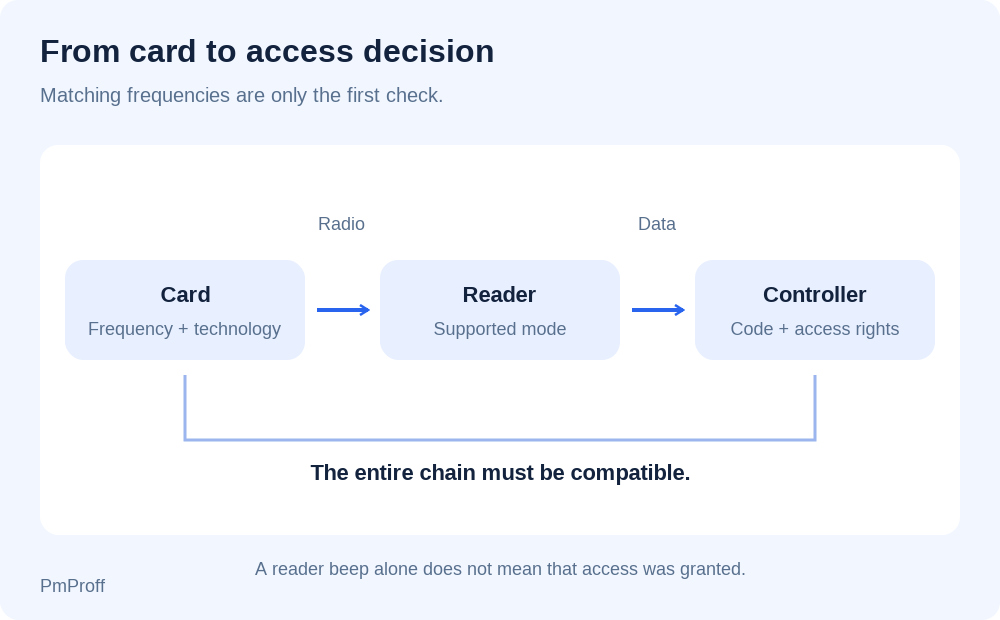
A matching frequency or an RFID label alone cannot establish card compatibility. Check the credential technology, reading mode and how the reader passes data to the controller. Before buying a batch, test one sample in the intended system.
Frequency is only the first check
125 kHz and 13.56 MHz are different bands. A multi-technology reader may support both, but its specifications must say so. For example, HID multiCLASS SE RP10 lists the technologies it supports. It does not claim to read every contactless card.
Why two 13.56 MHz cards can behave differently
This band includes several protocols and chip families. NXP’s MIFARE identification document distinguishes card activation from subsequent commands. Seeing a card identifier does not establish support for the secure application, keys and required authentication mode.
| Layer | What must match |
|---|---|
| Radio | Frequency and technology |
| Card data | Identifier or secure application |
| Reader → controller | Interface and format |
| Permissions | Enrolment and access to the door |
What happens after the reader
The reader must send data in a format that the controller supports. Check the interface, code length, settings and user enrolment method. A beep followed by a door remaining locked may mean the radio exchange succeeded but access was denied or the controller interpreted the code differently.
Replacing existing key fobs
Record the existing reader and controller models and keep a working credential for comparison. Ask the supplier to confirm the exact chip type. Colour and shape are insufficient. Enrol a sample and test both entry and revocation. A phone detecting the card via NFC is insufficient reason to order the entire batch.
Compatibility and security
Reading a credential and securing access are separate requirements. When upgrading, establish whether the system uses only an identifier or key-based authentication, who manages the keys and how a lost credential is revoked. Assess the card, reader and controller together.
Checks before choosing
- List the exact models in the existing system.
- Confirm credential technology and reading mode.
- Test a sample before ordering the batch.
Credential format and read range
Check the reader’s support for EM-Marine and the specific MIFARE family. MIFARE 1K and 4K do not necessarily use the same access settings. “Proximity key” identifies a contactless credential in general. It does not specify the chip, frequency or secure mode. Touch Memory uses physical contact, so choosing it by frequency as if it were an RFID card is inappropriate.
Card read range in centimetres depends on the reader, credential and installation. It is separate from the radio range to a hub. On a biometric terminal, face recognition distance and card read distance describe separate channels even if they appear on one line. Test each credential at the final installation point and verify the access decision as well as the reader beep.
Frequently asked questions
Will any MIFARE card work?
No. Confirm the chip family and the system’s supported mode.
Can a phone with NFC replace a key fob?
Only if the system supports the appropriate mobile credential. NFC hardware alone is insufficient.
Do identical fob shapes mean identical chips?
No. Identical housings can contain different credential technologies.
In brief
Verify the entire path from credential to controller decision. Frequency alone cannot confirm compatibility.