
Specifications and technology / Access control
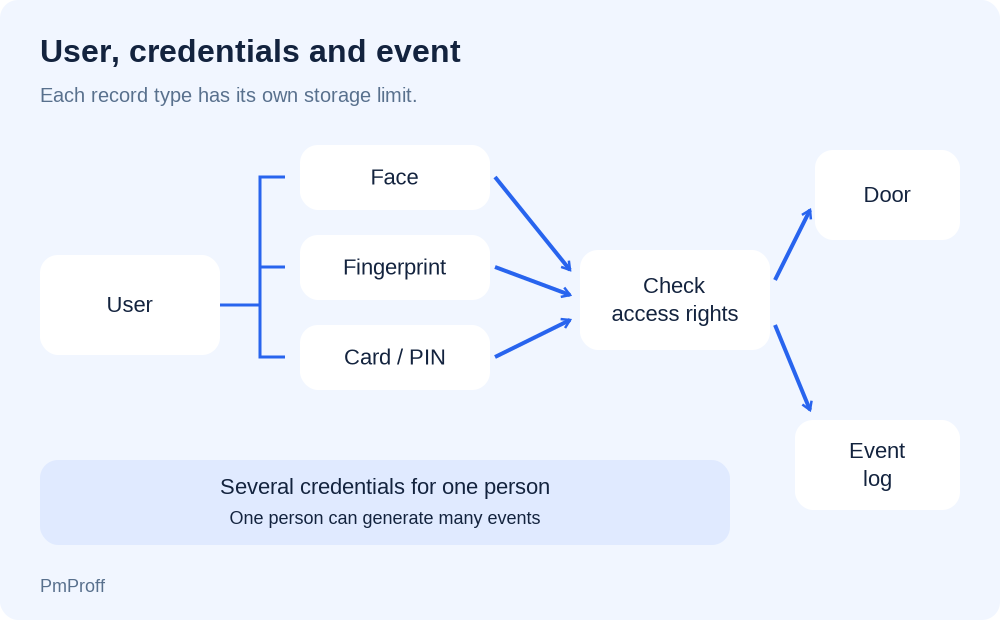
“1,000 users”, “3,000 fingerprints” and “100,000 events” refer to different limits. An access system stores user accounts, credentials, permissions and access history separately. Check each limit.
Users and their credentials
One user can have a card, a PIN, several enrolled fingers or a facial biometric record. User count and credential count can therefore differ. “Card/event memory” combines two separate limits. Check what each figure on either side of the slash means in the data sheet. Suprema’s user management documentation shows how credentials relate to a user record. Plan capacity around your policy: how many people need access, which entry methods they require and how many backup credentials you will issue.
1:N identification and 1:1 verification
In 1:N mode, the terminal searches the enrolled records for a match. In 1:1 mode, the user first claims an identity, for example by presenting an identifier, and the system compares the biometric sample against that record. Suprema explains 1:1 verification and 1:N identification. Rated capacity or speed can depend on the mode. Keep figures for different modes separate. Supporting two unlocking methods also does not guarantee two-factor verification: the system may accept either method alone.
| Capacity | What is counted |
|---|---|
| Users | Individual user accounts |
| Cards and codes | Issued credentials as defined for the model |
| Fingerprints and faces | Biometric records in the manufacturer’s stated units |
| Events | Operations, which can include multiple events per visitor |
Fingerprint and face memory: what does the device count?
The manufacturer may count fingers, biometric templates or enrolled people. Enrolment can require several scans of one finger. The number of scans cannot be equated with user capacity. Suprema’s enrolment procedure describes capturing a fingerprint and checking its quality. For facial recognition, also check the capacity unit and recognition conditions. “Fingerprint scanner” identifies the input method. It tells you little about speed, reliability under difficult conditions or spoof detection. Check each capability separately.
Event logs and user databases
An event records an action such as a successful entry, a denial or another operation the system supports. One person can generate many events a day. For example, 100 people × 4 logged events per day = 400 events per day. A 20,000-event buffer would hold about 50 days at that rate, provided there are no other entries. Actual retention may differ. Check how the system handles a full buffer, automatic upload to the server and loss of network connectivity. Local terminal storage and the server archive can have different limits.
Unlocking methods and practical checks
Cards, PINs, fingerprints, faces, apps and exit buttons serve different purposes. For each method, check who may pass, when access is allowed and what happens offline. Card read range and face recognition distance are separate measurements. For RFID, also check the credential frequency and format. Test biometrics at the installation site with the intended lighting and user position. Provide an authorised alternative for people who cannot use the primary method.
Revoking access and protecting data
Removing a card may leave the user’s other credentials active. Check the account, biometric records, PIN and synchronisation with offline terminals. Do not assume a biometric record is only an “irreversible code”. Record format and image storage depend on the product and its settings. For example, the BioStar X server settings distinguish between face data storage modes. Limit administrator access, use supported secure channels and define the required retention period. A technical feature alone cannot establish compliance with all personal data requirements.
Checks before choosing
- Count people and their credentials separately.
- Check capacity units and whether the figures apply to 1:1 or 1:N.
- Test offline operation and behaviour when the event log fills up.
- Test backup entry and complete revocation of access.
Unlocking methods and reading distances
“Fingerprint, face, card, code, key, app” lists separate access methods. Check whether they are alternatives or whether the system can require a combination. A mechanical key and a code lock remain non-biometric even when listed in the same catalogue field. For an app, check gateway, network and account requirements.
Face recognition distance in metres and card read range in centimetres describe different functions. Biometric performance depends on user position and the conditions specified by the manufacturer. Multiple access methods may differ in resistance to misuse and in operation during power loss. For each intended use, check emergency access, revocation and event logging.
Frequently asked questions
Do 3,000 fingerprints mean 3,000 people?
Not necessarily. One person may enrol several fingers, and the manufacturer may count templates. Check the exact definition.
Do a card and face recognition always provide two-factor access?
No. Check whether both are required or either one is sufficient.
Does a 100,000-event log store video of each entry?
Not necessarily. Text events, photos and video have separate capabilities and limits.
In brief
Access system capacity comprises several independent limits. Size the system for the number of people, the credentials they need and the history you need to retain.