
Specifications and technology / Uninterruptible power supplies
Choose a UPS for the load, required runtime and power quality the equipment needs. A large VA rating does not tell you how many hours a computer or router will run.
Define the task: shutting down a PC safely, riding through a brief interruption or keeping communications running for several hours. This determines both the UPS topology and the battery required.
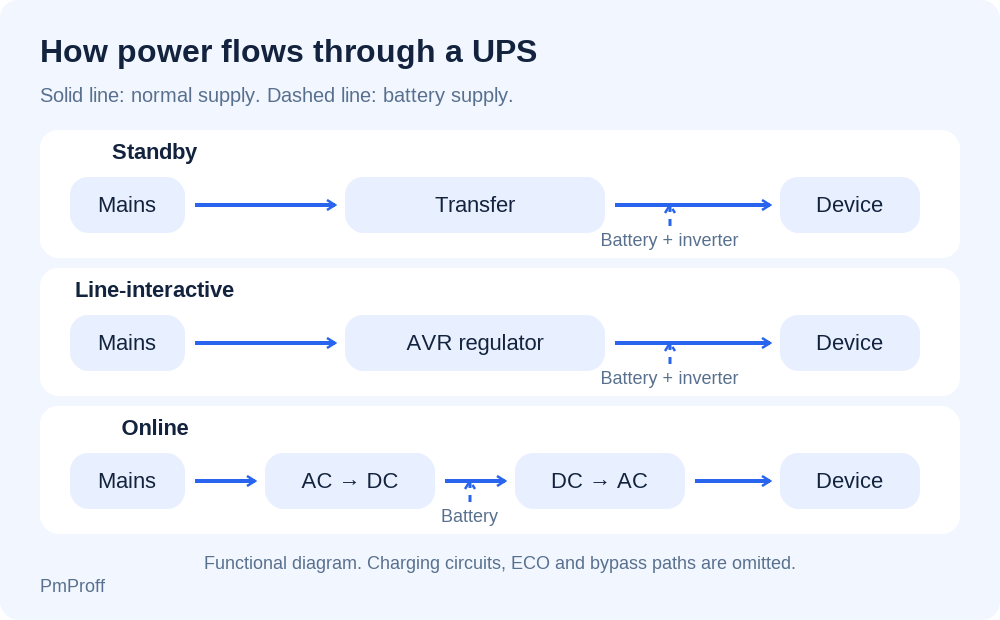
Three main UPS topologies
| Type | How it works | What to check |
|---|---|---|
| Standby / offline | Normally supplies mains power and transfers to battery when needed | Transfer time and input range |
| Line-interactive | Regulates voltage without switching to battery for every voltage change | AVR limits and output waveform on battery |
| Online, double-conversion | During normal operation AC is converted to DC and then back to AC | Operating modes, bypass, noise and losses |
In double-conversion mode, an online UPS does not need the usual mains-to-inverter transfer when input power fails. ECO and bypass modes behave differently. Check their individual conditions. Eaton’s UPS topology comparison.
VA and W: why both ratings matter
Watts measure real power and volt-amperes measure apparent power. The load must stay within both UPS limits. Use the ratings for the specific model instead of applying one assumed conversion factor.
For example, a UPS rated at 1000 VA / 600 W cannot support a continuous 700 W load, despite the larger VA figure. Use equipment specifications or measurements when sizing a UPS. Eaton guide to VA, watts and power factor.
Example load calculation
Suppose a recorder draws 30 W, network equipment draws 20 W and separately counted cameras draw 40 W. The total is 90 W. Check peak operation, startup surges and the manufacturer’s recommended headroom before selecting a rating.
If you measured the PoE switch with the cameras connected, their consumption is already included. If you counted only the switch itself, add the cameras separately. Avoiding double counting often matters more than a complicated formula.
Finding battery runtime
For a complete UPS, start with its runtime table or curve at your load in watts. A 1000 VA label alone cannot supply that answer. Two models with the same power rating may have different batteries.
Compare runtime at the same load. “Up to 30 minutes” needs operating conditions. Check battery condition and temperature, support for external battery modules and recharge time. Eaton desktop UPS selection guide.
Waveform, transfer time and special loads
The battery-mode output waveform must suit the load. For motors or specialised electronics, check the manufacturer’s waveform and startup current requirements as well as wattage.
The equipment also determines how long an interruption it can tolerate. If a device reboots on transfer to battery, battery capacity may have little to do with it. A qualified specialist should check the connection arrangement for a boiler, pump or fixed electrical installation.
Keep high-power heaters and other unapproved loads disconnected. Never alter protective earthing or backfeed household wiring from a UPS using a homemade cable.
Specifications to check
- Limits in watts and VA, and maximum load.
- Runtime at your load.
- Output waveform on battery and transfer time.
- Socket type and number of battery-backed outlets.
- Recharge time and approved battery modules.
- Noise, ventilation, dimensions and installation requirements.
- USB or network management if the PC needs automatic shutdown.
Frequency, phases and efficiency
Input frequency describes the permitted supply. Output frequency is what the load receives. A wide input range does not mean that the output continually varies over the same range. Output waveform matters particularly for motors and sensitive power supplies. “Online UPS” describes the double-conversion topology. Check battery capacity separately.
Check phase count at both input and output. Configurations include 1:1, 3:1 and 3:3. Eaton lists phase configurations and frequency ranges in its UPS specifications. Connecting three-phase equipment requires more than a total wattage check.
Efficiency is useful output power divided by input power in a specified mode. It varies with load, so a peak advertised value does not apply in all conditions. Compare matching loads and operating modes, including normal conversion and economy bypass. Eaton explains the trade-off in economy mode.
Device backup and clock batteries
Check which function a backup battery actually powers. A CR2032 in an NVR may power only its clock. It cannot keep cameras recording when mains power fails. A backup battery in a siren or alarm panel supports the specified functions within its load and remaining-charge limits. External devices may need their own backup.
On a mini UPS, check each output separately. DC 5/9/12 V, USB and passive PoE have different requirements. Passive PoE lacks the automatic negotiation used by IEEE PoE. Verify connector, polarity, voltage and total power with several outputs in use. More about PoE. Several outputs may share a power limit that prevents simultaneous maximum load on every port.
Frequently asked questions
Does a router need a large 230 V UPS?
No. A compatible DC UPS may be more practical. Check voltage, polarity, connectors, current and power for every device, including the ONT.
Does a higher VA rating mean longer runtime?
Not necessarily. VA describes the load the UPS can support. Runtime depends on the battery, consumption and losses.
Can I fit a larger battery myself?
Only if the manufacturer supports that configuration. The charger, cooling and protection features may be designed for a specific battery.
Determine the load and required runtime first. Then check topology, output waveform and compatibility. Read runtime from the curve for the specific model.