
Specifications and technology / Intercoms and access control
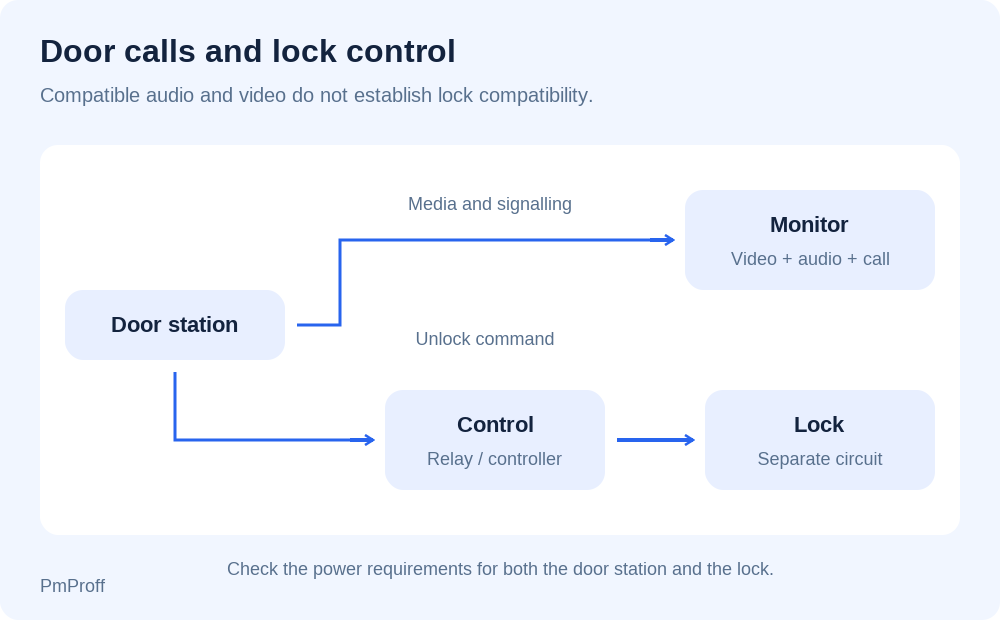
Sharing a brand, connector or wire count does not guarantee that an intercom monitor and door station will work together. Calling, video, audio and lock control are separate functions. Check each one in the intended configuration.
Start with the system type
Check the exact models against the manufacturer’s compatibility table. Analogue, IP and two-wire systems can use different interfaces. Even “two-wire” does not identify a universal standard. 2N describes a dedicated 2Wire converter for running IP equipment over an existing wire pair. This requires a compatible kit, not simply joining the wires.
Check video and call handling together
A monitor may display a camera feed yet be unable to accept calls from the door station or provide two-way audio. For IP systems, check protocol, registration, codecs and support for the intended use. For calls to a phone, also check the service, account requirements and dependence on an internet connection.
| Component | What to match |
|---|---|
| Door station ↔ monitor | System type, calls, video and audio |
| Power | Voltage, current and PoE as specified |
| Lock | Output type and load rating |
| Phone | Service, permissions and operation away from Wi-Fi |
The lock has a separate electrical circuit
The door station may provide relay contacts or a powered output with a specified rating. Match the output type, lock requirements, power source and unlock command duration. For the basic distinction, see the guide to dry contacts. A door station powered by PoE may still need a separate supply for the lock.
Where the control device is installed
For greater security, the control device can be mounted inside the protected area. 2N Security Relay is an example of a dedicated relay between the door station and the lock. Such a relay requires a supported pairing and configuration. It cannot be assumed to work with an arbitrary door station.
Commissioning the system
Test calls, conversation, day and night video, and unlocking from both the monitor and an authorised phone. Then check behaviour during loss of internet or power, manual egress and recovery after a restart. On a multi-tenant system, test call addressing and permissions. Agree on emergency egress arrangements separately with a qualified professional.
Checks before choosing
- Check exact models before purchase.
- Test every function as well as the picture.
- Agree on outage behaviour, manual egress and user permissions.
Display, recording and talking to visitors
Screen diagonal gives physical size, while resolution gives the pixel count. A 1024 × 600 screen does not set the resolution of a camera recording. Check the display, stream and saved file separately. A larger screen may be easier to view without showing finer detail.
For photo or video recording, check storage medium, capacity, recording triggers and playback options. A visitor conversation may use a handset or hands-free mode. Hands-free alone does not guarantee full-duplex audio without muting.
The control type may be physical buttons, touch buttons or a touchscreen. “Intercom” may refer to calls between indoor monitors, whereas subscriber capacity determines call addressing. Support for several door stations or cameras does not necessarily mean the system can serve several independent apartments. Check these limits separately in the compatible system’s manual.
Network, display and motion-triggered recording
IP networking over Ethernet or Wi-Fi and an analogue four-wire connection describe different arrangements. Match components using their documented interfaces and compatibility. Wire count or connector name alone is insufficient. Screen diagonal gives physical size and resolution gives pixel count. Physical buttons, touch buttons and a touchscreen offer different controls.
Motion-triggered recording on one or four channels describes support for that specific mode. The number of video inputs alone does not establish it. Check memory card recording, pre-recording, schedules, accessible footage and notifications. Motion and a call-button press are different events. For remote unlocking, check user permissions and operation without internet access.
Frequently asked questions
Are monitors and door stations from the same brand always compatible?
No. Product series and system types may differ.
Is a four-wire connection universal?
No. Check the diagram and compatibility of the specific devices.
Will the door station’s PoE supply power any lock?
No. Check the output and power source separately.
In brief
Check the door station, monitor and lock as a system with separate paths for calls, media and control.