
Specifications and technology / Video surveillance
Retention depends on the actual data rate and usable recording space. A disk labelled “4 TB” alone cannot tell you whether you can retain two weeks of footage.
The calculation below covers several cameras, accounts for the recording mode and shows how to verify retention once the system is running. For codec differences, see the guide to H.264 and H.265.
What you need for the calculation
List the number of cameras, average bitrate of each recorded stream, recording hours per day and required retention period. Include audio and additional streams if the NVR stores them. Use video bitrate for the calculation. A gigabit network port does not imply a gigabit recording stream.
For initial planning, use manufacturer estimates with specified settings. For example, AXIS Site Designer relates storage and bandwidth requirements to recorder specifications. After installation, refine the estimate using the actual scene.
A formula for continuous recording
For bitrate in Mbps, daily storage in decimal GB equals total average bitrate × 10.8. The factor comes from 86,400 seconds per day and eight bits per byte. Multiply daily storage by the required number of days.
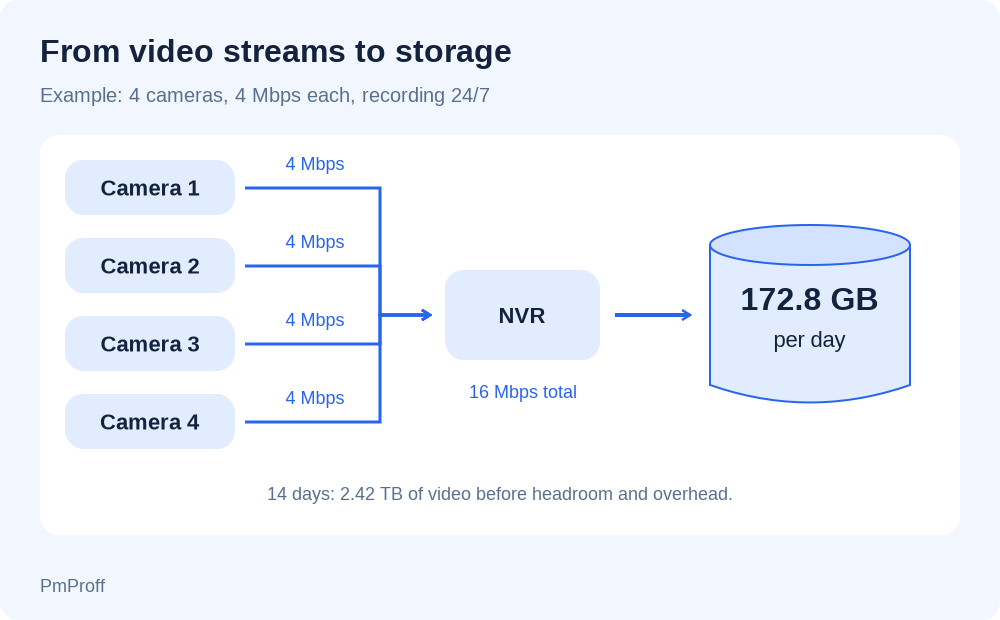
Suppose four cameras record continuously at an average of 4 Mbps each. Together they produce 16 Mbps, or 172.8 GB per day. Over 14 days, that is approximately 2419.2 GB or 2.42 TB. This figure covers the video payload. Allow additional space when selecting a disk.
How bitrate affects retention
| Per camera | Total per day | Over 14 days |
|---|---|---|
| 2 Mbps | 86.4 GB | 1.21 TB |
| 4 Mbps | 172.8 GB | 2.42 TB |
| 8 Mbps | 345.6 GB | 4.84 TB |
The table assumes four cameras with equal average bitrates, recording 24 hours per day, using decimal units. Lowering bitrate saves space but can erase important detail. Check that moving subjects remain clear before optimising storage.
Why actual storage use differs
At variable bitrate, scene complexity affects storage. Rain, foliage, people moving and noise at night can all raise the bitrate. The maximum bitrate cap differs from the daily average. For rate control methods and their trade-offs, see the Axis guide to bitrate control.
Allow for variation, overhead and the file system. The nameplate capacity, capacity displayed after formatting and space available for recordings may differ. For RAID, use the array’s usable capacity after redundancy, rather than the sum of individual drive labels.
Motion recording: estimating the savings
For event recording, use the actual recorded hours. Avoid assuming “80% less”: an outdoor scene with trees or a busy shop may trigger recording almost continuously. Include pre-event and post-event intervals and false triggers.
If you need a guaranteed minimum retention period, base the design on more than a quiet night or an empty room. Measure several representative days and check the busiest plausible scenario.
Checks after commissioning
- Confirm that the intended streams are being recorded.
- Check the NVR’s incoming bandwidth limit and drive compatibility.
- Measure storage use over several days with different activity levels.
- Compare the oldest available recording with the required retention date.
- Check what happens when storage fills and whether disk errors trigger alerts.
- Export important events before loop recording overwrites them.
Frequently asked questions
How many days of footage fit on 1 TB?
At an illustrative total of 16 Mbps, approximately 5.8 days before reserving space. An accurate answer requires the bitrate and recording mode.
Does RAID replace a backup?
No. It can protect against certain disk failures, but it cannot protect against deletion, overwrite or every system failure.
Can I use this formula for microSD cards?
Yes, for converting bitrate to storage. Check card endurance and supported capacity separately: choosing a microSD card for a camera.
In brief
Add the average bitrates, multiply by recording time, allow appropriate headroom and verify actual retention. Megapixel count alone cannot determine disk size.