
Specifications and technology / Video surveillance
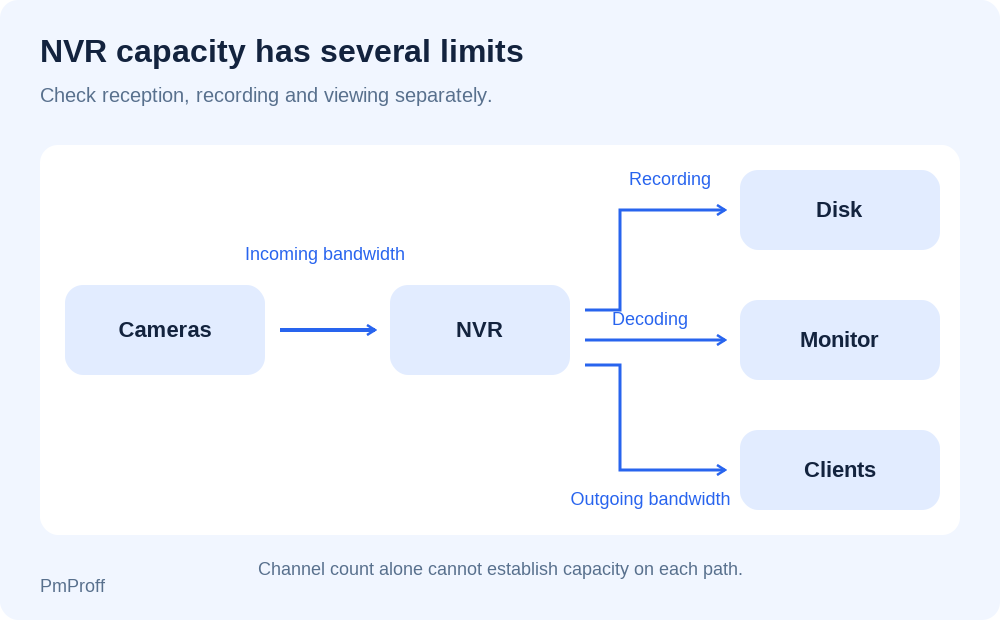
An NVR’s channel count describes only one aspect of its capacity. The recorder must receive video, record it, display it on a monitor and deliver it to remote users. Each task can have a different limit.
A “16-channel” label does not promise simultaneous live viewing of sixteen cameras at maximum quality with every analytics feature enabled.
Which data sheet entries to read together
| Parameter | What it limits | What to compare it with |
|---|---|---|
| IP channels | Number of sources | Planned cameras and future expansion |
| Incoming bandwidth | Total incoming traffic | Streams the NVR receives |
| Decoding capability | Decoding for display | Resolution, frame rate and number of windows |
| Outgoing bandwidth | Transmission to clients | Simultaneous remote viewing |
| Disks and capacity | Storage | Retention requirements and compatible drives |
Manufacturers specify these capabilities separately. For example, see the Hikvision NVR comparison table. Check the exact model and mode. Notes may specify conditions for analytics or resolution that differ within one series.
Example: calculating incoming bandwidth
Suppose eight cameras transmit at 6 Mbps each. Their main video streams total 8 × 6 = 48 Mbps. If the NVR also receives eight substreams at 0.5 Mbps each, add another 4 Mbps. That gives 52 Mbps of video before accounting for other traffic.
These illustrative settings do not apply to every installation. Check which streams the system actually requests, add audio and protocol overhead, and allow headroom for scene changes. For VBR, look beyond the average on a quiet day: night-time noise, rain and movement can change the load.
Why recordings can be fine while the grid view stutters
Decoding turns compressed data into an image for display. Check the supported combinations of camera count, resolution and frame rate separately from the number of recording channels. For example, the M-Series description lists decoding capacity and video outputs as separate specifications.
Grid views often use substreams and switch to the main stream for one large window. See Hikvision’s stream selection documentation. If you view video on a PC, check the client computer’s capabilities as well. Identify the bottleneck before reducing recording quality.
Specifications that describe different limits
A gigabit network port does not guarantee a gigabit of incoming NVR bandwidth. A larger hard disk cannot increase the supported camera count. The number of PoE ports gives neither the power budget nor necessarily the total channel count.
Size the recording archive separately using bitrate and retention time, and size the camera supply using the PoE specifications. Before buying, check the compatible drive list and maximum capacity per drive.
Testing the system before handover
- Enable all planned cameras and required functions.
- Test recording, the local grid view and simultaneous playback.
- Add the expected number of remote users.
- Assess traffic and stability in a scene with movement.
- Export several recordings and check audio and timestamps.
Frame rate, recording modes and drive bays
Recording frame rate in frames per second (fps) measures a different quantity from bitrate. Check whether it is a per-channel figure and which resolution it applies to. A rating of 20 fps at 12 MP does not promise 30 fps in that mode. Supported resolutions may also have channel-count limits. Example NVR data sheet with separate operating modes.
The drive count specifies how many drives the recorder supports. Check how many are included, the per-drive and total capacity limits, the compatibility list and support for the array mode you need. Two bays alone do not guarantee redundancy. “Linux” describes the embedded system’s software platform. It does not imply that you can install applications as on a PC.
The camera count in a kit describes its contents. It can be lower than the NVR’s channel count. When planning expansion, check channels, streams, power and storage together.
Frequently asked questions
Will an 8-channel NVR handle eight cameras?
Only if it also supports their modes, combined traffic, analytics, viewing and storage requirements. Channel count is the first check.
Will a new drive improve decoding speed?
No. Decoding uses a different subsystem. A faulty or incompatible drive can cause separate recording problems.
Why did the system’s capacity change when I enabled analytics?
The selected mode may have its own resource limits. Check the notes for that function in the data sheet and manual.
In brief
Choose the NVR for the complete workload: reception, recording, display and remote clients. Channel count alone is insufficient.